October 19, 2026Journal entry
Bring-up notes #1: the RK3566 board that would not boot
The design worked on the first spin. It sat dead for four weeks anyway, because 29 parts were never placed, and the order screen had told us so.
By Andrew Douglass · Founder
Disclosure: Our articles contain affiliate links, including Amazon. If you buy through one, we may earn a commission at no extra cost to you, and as an Amazon Associate we earn from qualifying purchases. It never affects our testing, measurements, or verdicts. Full disclosure.
This is the first entry in Bring-up notes, the series about getting our own boards to life. It starts with the RK3566 board, the first WarpKVM board we designed ourselves around a Rockchip chip.
The design worked on the first spin, apart from a list of ordinary first-board mistakes. It did not boot for four weeks anyway, because 29 parts were never placed. JLCPCB had all of them in stock. We just never selected them for assembly, and the order screen told us so before we paid.
The board
The RK3566 board was our 1080p design: an RK3566 SoC, Rockchip's RK628H HDMI bridge, 1 GB of DDR3L across two chips, an RTL8363NB switch so one cable could carry the host network and the KVM, PoE, a Wi-Fi and Bluetooth module, SPI NOR flash for the bootloader, and a microSD slot. Picking the SoC covers why it was the RK3566 at the time.
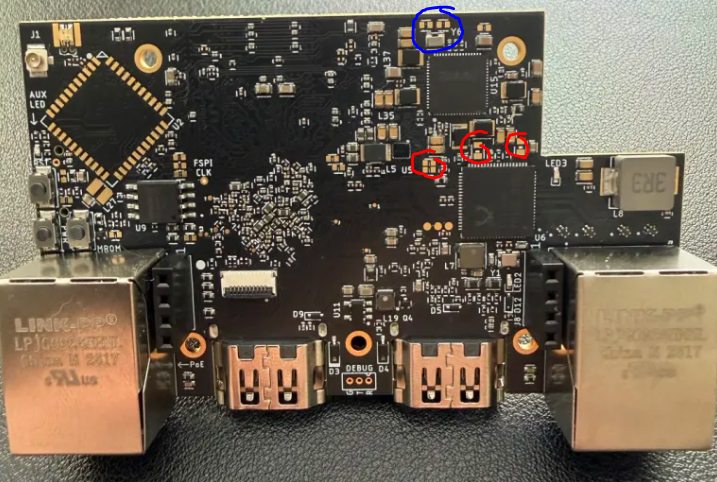
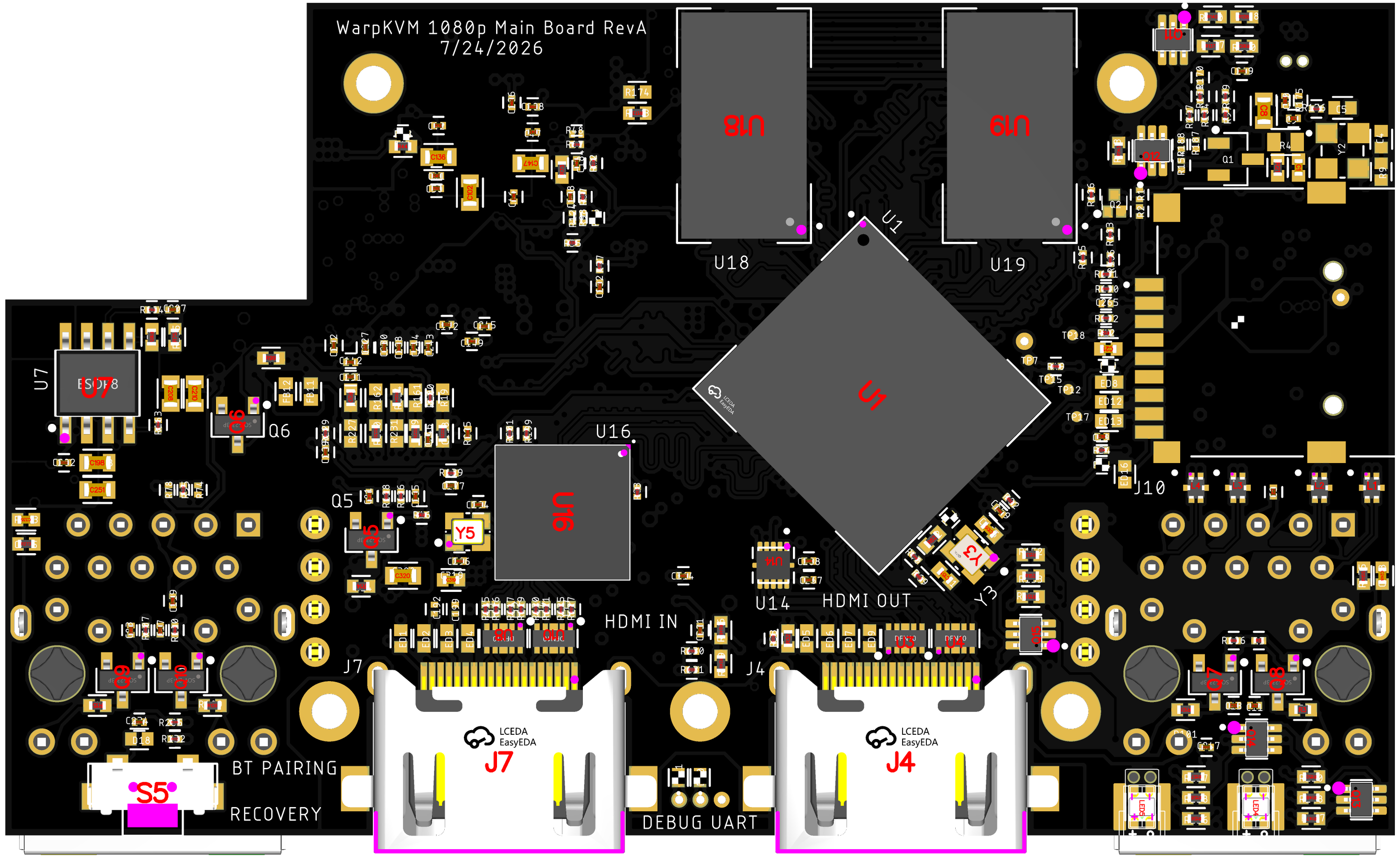
The boards arrived on August 6. On first power there was nothing on the serial console, and the chip never showed up over USB in maskrom mode, which is the recovery mode Rockchip parts drop into when they cannot find anything to boot. Nine days later I was still getting nothing on either.
Four weeks of nothing, mostly
I would love to say I spent those weeks methodically chasing it. I did not. I was honestly a little disheartened that it did not come up, and I got pulled onto other work, so the board mostly sat on the bench.
The day I finally sat down to investigate properly was the same day I found the problem. The USB PHY's analog supply comes in through two ferrite beads, FB4 and FB5, and both pads were empty. With no analog supply the USB PHY cannot pull its data line up, so the chip can never announce itself in maskrom mode. The crystal and the flash chip, the two things I had suspected, were both fine.
Then we compared the assembly order against our own BOM, and the ferrites were not alone.
What we did not select
On a JLCPCB order you upload a BOM and a placement file, and each line needs a part selected before it gets placed. Our BOM review for this board had three parts with nothing selected: the KLXES15AAA1 ESD diodes, the 120 ohm 1.3 A ferrites, and the 120 ohm 2 A ferrites, a line that also covered R4. Every one of those lines shows a quantity of 0 and an empty checkbox.
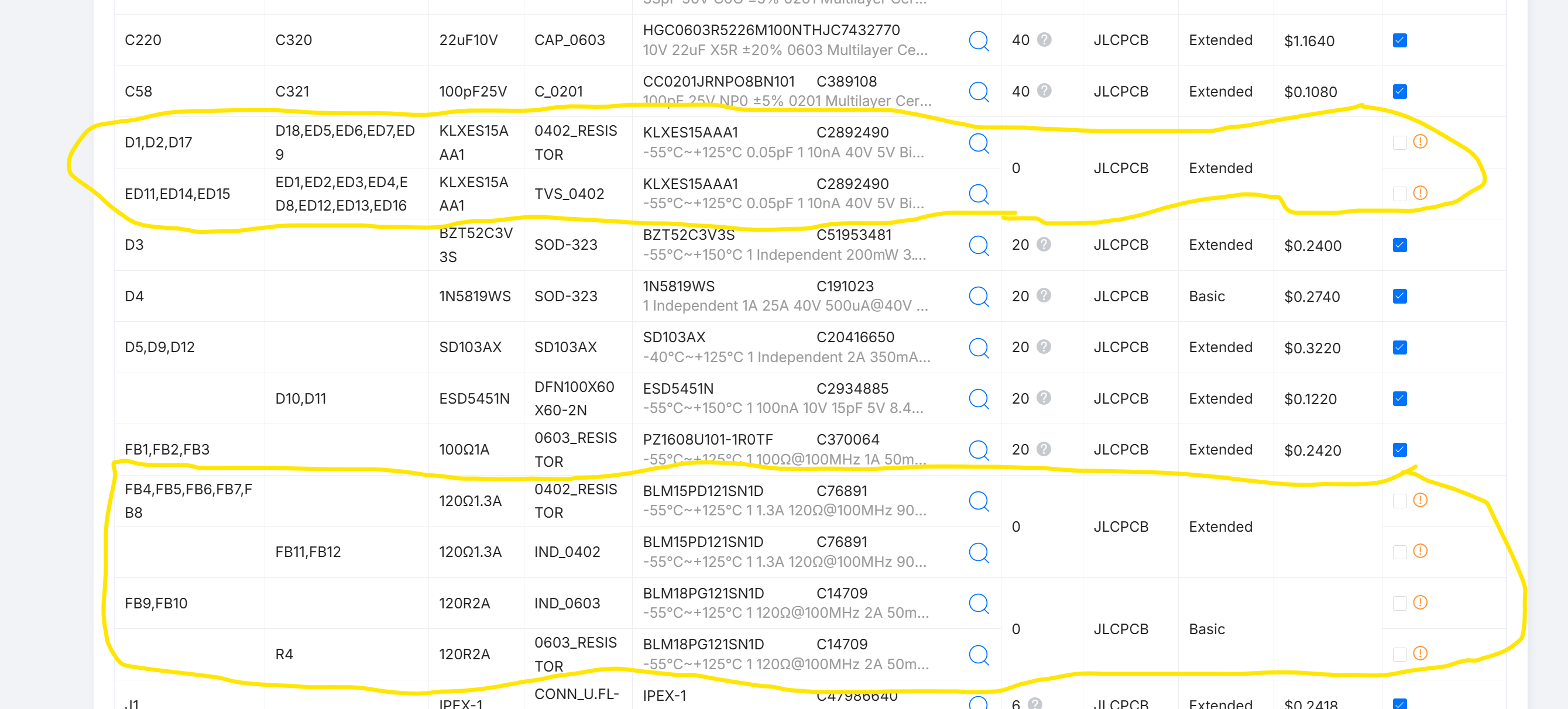
The parts themselves were not a problem. The 1.3 A bead is a Murata BLM15PD121SN1D, JLCPCB part C76891, and when we checked, JLCPCB had 378,000 of them in stock. We simply never picked it.
And JLCPCB did warn us. When lines are left unselected, the order flow stops with a dialog before checkout:
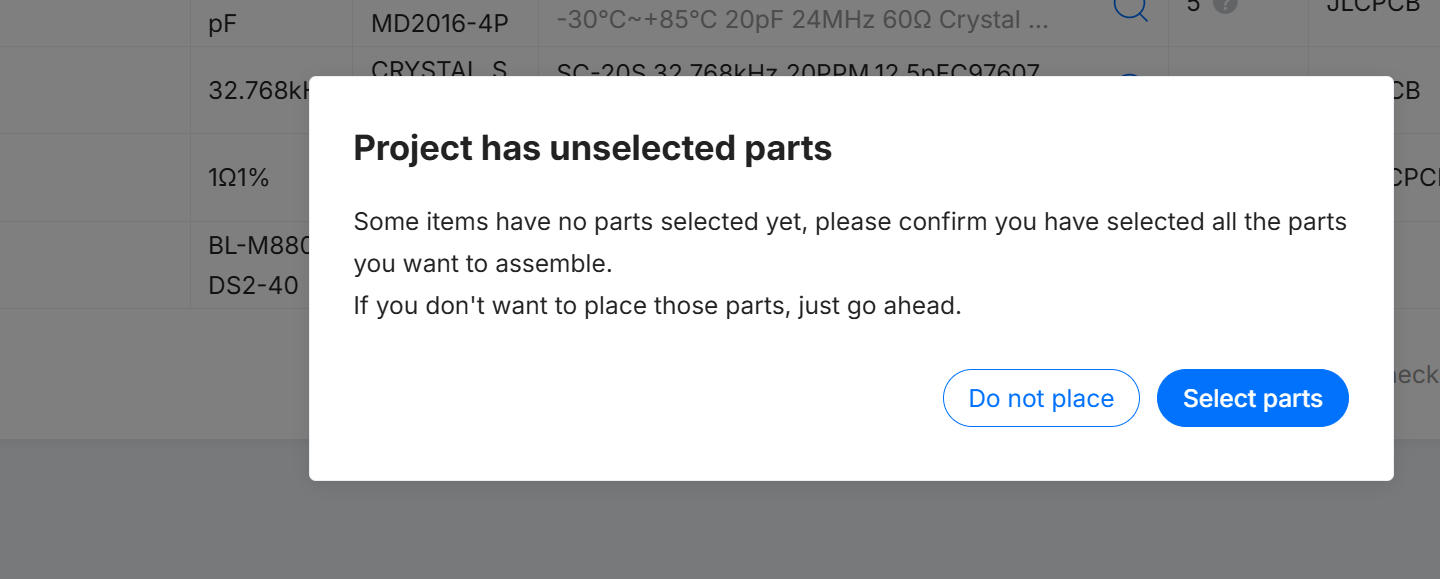
Clicking Do not place there is a perfectly reasonable thing to do for a part you plan to fit yourself. We had one of those on this order: the Wi-Fi module, which we always meant to hand solder. Somewhere in the same click, 29 parts we did want went with it.
Not all of those parts mattered on the bench. The 19 ESD diodes are protection, and a prototype runs fine without them. The ferrites were a different story, because each one feeds a supply rail:
- FB4 and FB5 feed the USB PHY. Missing, the chip can never enter maskrom over USB. This was the whole reason for the silence.
- FB6 and FB7 feed the camera input path, so capture from the RK628H could never have worked.
- FB11 and FB12 feed the switch's analog and PLL domains. Its digital core was powered straight from the 1.1 V rail, so the switch sat half on with its PHYs unpowered, and read about 80 C on a handheld IR thermometer, one of the ones left over from 2020.
The blue circle in the photo is a different mistake, and this one was entirely ours. The two load capacitors for the PMIC's 32.768 kHz crystal, C174 and C175, were set to NC in our own schematic, so the assembler did exactly what we asked and left them off. During bring-up we took the crystal off as well and let the RK809 run on its internal oscillator, which is less accurate, but good enough for this board.
After the beads
We ordered replacement ferrite beads, and I soldered every missing one on by hand. With FB4 and FB5 in place, the chip showed up as a maskrom device on the first try, and from there the board came up one layer at a time. It did not need a single new chip. It needed us to fix our own mistakes in order.
The memory came up at half size. DDR trained on the first attempt, but at 16 bits wide and 512 MB instead of 32 bits and 1 GB. We had put the two DDR3L chips on separate chip selects instead of tying their chip select and ODT lines together, so only one chip was ever in use. The boot log says it plainly:
DDR3, 324MHz
BW=16 Col=10 Bk=8 CS0 Row=15 CS=1 Size=512MB
DRAM:  512 MiB (effective 510 MiB)
That is a respin fix, not a software one, so this board lived with 512 MB. For bring-up that was plenty.
The flash returned corrupted data in quad mode. Writes and single-lane reads were bit exact, but 4-lane reads came back with bits 3 and 7 forced high, so 52 4b 4e 53 read as da cb ce db. The cause was C29, a 100 nF capacitor we had put on the flash's HOLD line, which is also data line 3 in quad mode. A capacitor on a data line is a low-pass filter. Until a respin removes it, the device tree runs the flash one lane at a time:
spi-max-frequency = <50000000>;
spi-rx-bus-width = <1>; /* x4 reads return bits 3 and 7 stuck high: C29 (100 nF) on IO3/HOLD# loads the data line; respin: drop C29 */
spi-tx-bus-width = <1>;
The board ran hot, and it was not the switch. Fitting the beads helped the switch, but the board still ran warm. The GPU power domain never acknowledged power-up, and the GPU rail read 0.5 V while the PMIC reported it on at 0.9 V. When I turned that regulator off over I2C, the board's input current dropped by about 1 A. The buck had been sitting in current limit into a near short since first power-on. The cause was a solder bridge from the rail to ground between two parts we had placed too close together. Clearing it meant lifting two neighboring capacitors to get at it. After that the rail read 0.9 V, the input current was normal, and the Mali GPU probed.
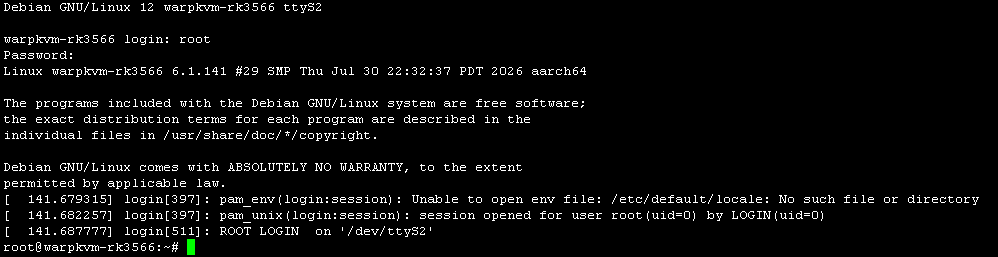
Then Linux booted to a login prompt on the serial console:
It captures
The RK628H came up as expected. It had already run on the Firefly RK3576 dev board, so this was the part of the board I worried about least. Once the camera input rails were enabled in the device tree, the board captured and streamed 1080p60.
One thing I would not have guessed: running Bluetooth while Wi-Fi was streaming choked the stream. The two share one module, and on a KVM that is a constraint worth designing around.
The respin list
Everything we found went into a respin list, each item with its evidence and its fix. The ones worth knowing about if you are designing around an RK3566:
| What we found | Cause | Fix |
|---|---|---|
| No maskrom, no serial, no capture, hot switch | 29 BOM lines never selected for assembly, including every 120 ohm ferrite | Select every line, and diff the assembly BOM against your own before paying |
| 512 MB of the fitted 1 GB | The two DDR3L chips on separate chip selects | Both CS# to CS0, both ODT to ODT0 |
| Quad SPI reads corrupt bits 3 and 7 | 100 nF capacitor on the HOLD / IO3 line | Remove it, keep the 10k pull-up |
| GPU rail in current limit, board hot | Solder bridge between output parts placed too close | Open up the spacing and check the paste apertures |
| Ethernet to the switch dead | RGMII TX and RX not crossed between the SoC and the switch | Swap the 12 lines |
| HDMI source detect never works | The board back-drives the HDMI 5V pin itself | Stop back-driving it, so only the source can raise it |
| Reset button does nothing | PWR and RST silkscreen labels swapped | Swap the labels |
| RJ45 link LEDs on the wrong jack | Green LED nets crossed between the two jacks | Swap the two driver inputs |
| PMIC crystal with no load capacitors | C174 and C175 set to NC in our schematic | Fit them, or drop the crystal and use the RK809's internal oscillator |
Most of these are ordinary first-board mistakes, and none of them needed a new chip. Capture, the part the whole product is built on, worked once it had power.
What the prototype cost
A few people have asked what a board like this costs to prototype at JLCPCB. It was two orders: the main board, and a separate USB/power board that carries the PoE and USB side of the design.
| Line | Qty | Price |
|---|---|---|
| Main board, bare PCB: 8 layers, 83 x 71.7 mm, ENIG, 0.15 mm vias, epoxy filled and capped, flying probe test | 5 | $257.67 |
| Main board, assembly on both sides, including the parts JLCPCB sourced | 3 | $469.60 |
| Main board order, shipping | $28.06 | |
| Main board order, coupon | -$6.00 | |
| USB/power board, bare PCB | 5 | $4.00 |
| USB/power board, assembly | 3 | $183.30 |
| Total, before tariffs | $936.63 |
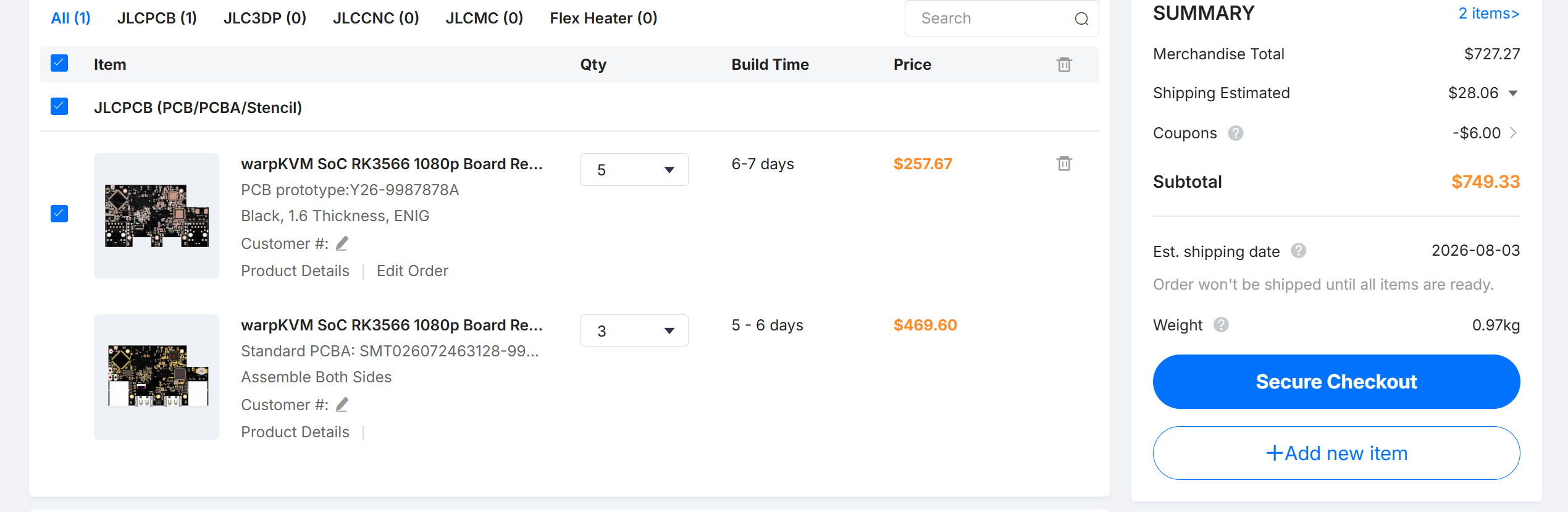
That is about $312 per complete set of main board and power board, with two spare bare PCBs of each. The power board was a simple board, $187.30 for three assembled, so most of the money went into the 8-layer main board. The total does not include tariffs, shipping on the power board order, which it shared with another board, the Wi-Fi module I soldered by hand, or the replacement ferrites. And because 29 parts were never placed, it is a little less than this board should have cost.
What the mistake cost, and what I would do differently
The real cost was four weeks, and very little of it was engineering. Finding it took one sitting once I actually looked. I set a dead board aside and let a missing checkbox look like a hard problem.
What I would do differently:
- Treat that dialog as a stop sign. If a JLCPCB order says a project has unselected parts, select parts line by line. Only click Do not place when every unselected line is one you planned to fit yourself. If you have parts to fit by hand, JLCPCB will also take consigned parts and place them for you, which is how we would handle the Wi-Fi module next time.
- Diff the assembly BOM against your own. Before paying, compare the designators JLCPCB will actually place with the ones in your design. It takes minutes, and it would have caught all 29.
- When a board is silent, check the pads before the theory. I suspected the crystal and the flash. The answer was visible with a magnifier.
Where it went
This board never got its respin. By the time it was streaming, we had decided the RV1126B was the better chip for the smaller product, cheaper than the RK3566 and good for 4K30, and we were finishing the RK3576 board for WarpKVM 01. We carried every fix from this list into those designs instead.
Since we will not use this board, we plan to publish its schematics and layout, so someone can build on it.
Next in this series: Bring-up notes #2, the RK3576 4K60 board.