October 12, 2026Journal entry
warpd #1: Full color through a 4:2:2 pipe
The RK628 locks its output to 4:2:2 in silicon. Doubling the width before the subsample step gets full-resolution color through anyway, for about 7 ms of encode time.
By Andrew Douglass · Founder
Disclosure: Our articles contain affiliate links, including Amazon. If you buy through one, we may earn a commission at no extra cost to you, and as an Amazon Associate we earn from qualifying purchases. It never affects our testing, measurements, or verdicts. Full disclosure.
warpd is our in-house streamer: the software on the KVM that captures the video, encodes it and sends it to your browser. This is the first entry in the warpd series, picking up where the capture chip post left off: with a bridge that throws away half your color before the software sees a pixel.
Every RK628 locks its output to the processor to YUV 4:2:2. We found a way to get full-resolution color through it anyway. On a one-pixel red grating, the input 4:2:2 destroys completely, the color comes back almost in full: the red channel's swing across it goes from 0 to 87 on the RK628H. It costs about 7 ms of extra encode time and the link bandwidth we would otherwise use for 120 Hz, so it ships as an option: Full color or Low latency, your choice.
The problem you can see
4:2:2 chroma subsampling keeps full brightness detail but shares one color sample between every two horizontal pixels. On video you never notice. On a desktop you do. White text on a red badge picks up a dark fringe, colored text goes muddy at its edges, and a one-pixel red line on black turns into a smear.

I wanted to be able to tell people "use the KVM as your local monitor and you will not be able to tell it is there." With 4:2:2 in the path, that was not true.
The fix that does not exist
The obvious move is to make the bridge output RGB or 4:4:4 instead. The RK628F datasheet rules it out: the CSI transmitter's supported format is YUV 4:2:2, and nothing else. The H shares that silicon, and Rockchip's own driver identifies our chip as "RK628F/H". It is not a driver setting. It is the silicon.
We tried anyway on an earlier RK628 board, because the driver will advertise RGB888 and the source will happily send it. The capture returned invalid framing and then hung the board hard enough to need a power cycle.
So I stopped trying to get around the 4:2:2 stage and looked at what it actually does, and where it sits.
The trick: make the pairs identical
4:2:2 takes each horizontal pair of pixels and gives them one shared color value. Pixel A's color and pixel B's color get averaged. That averaging is the loss.
The detail that matters is the order of operations inside the chip. The RK628 has a scaler, and the scaler runs before the 4:2:2 step.
So we tell the scaler to stretch the 1920-wide frame to 3840 wide, exactly double. Now every original pixel becomes two identical pixels going into the 4:2:2 stage, and each pair that shares a color sample is two copies of the same source pixel. Averaging a pixel with a copy of itself changes nothing. Every original pixel keeps its own full color through the 4:2:2 link. On the other side, we scale 3840 back down to 1920 and have the original frame, in full color.
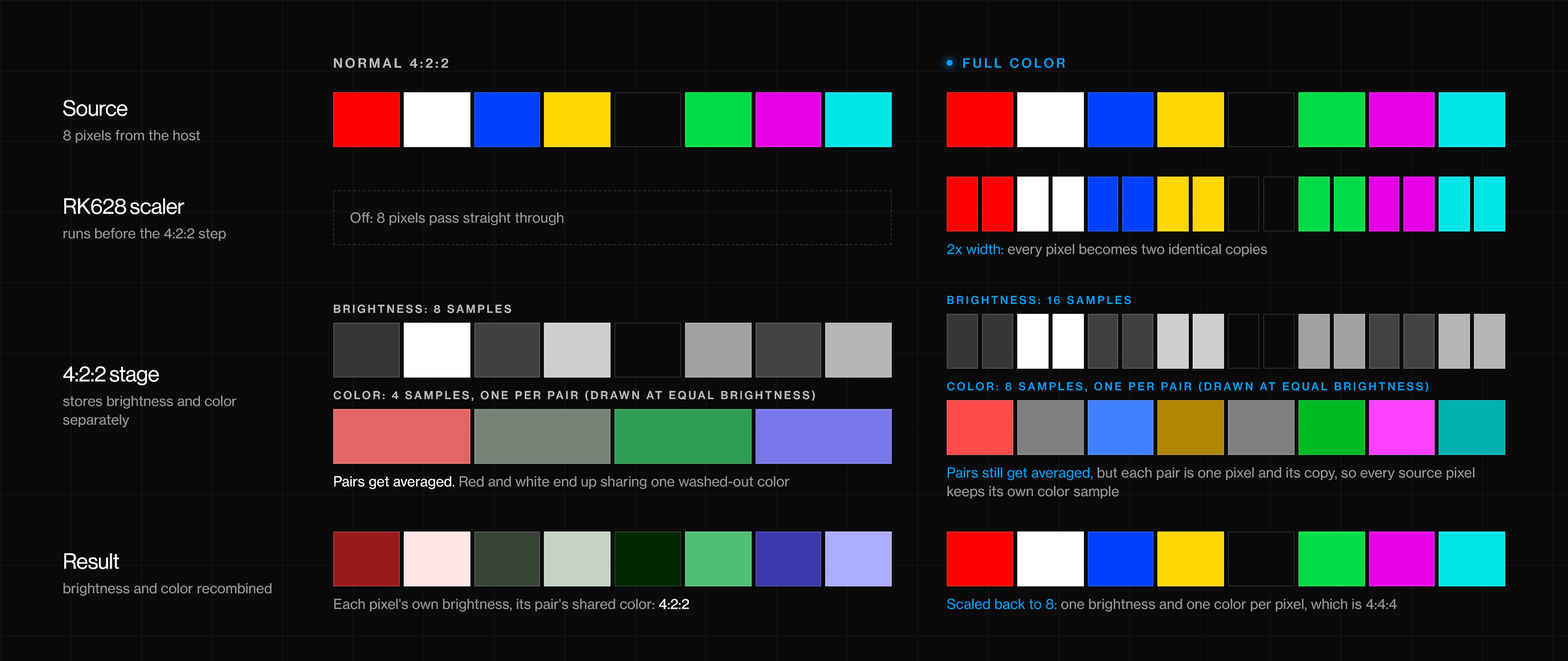
It feels like smuggling 4:4:4 through a 4:2:2 channel, which is what we call it internally. In the RK628H driver on the Aura, it is one extra timing and a switch:
/*
* WarpKVM chroma-smuggle target: 3840x1080@60 (2x horizontal of 1080p60,
* 297 MHz, doubled H porches, vertical unchanged). Driving the RK628 scaler
* to 2x width BEFORE the CSI 4:2:2 decimation keeps a full chroma sample per
* source pixel; the consumer downscales 3840->1920 to recover 4:4:4.
*/
static struct v4l2_dv_timings smuggle_timing = {
.type = V4L2_DV_BT_656_1120,
.bt = {
.interlaced = V4L2_DV_PROGRESSIVE,
.width = 3840,
.height = 1080,
.hfrontporch = 176,
.hsync = 88,
.hbackporch = 296,
.vfrontporch = 4,
.vsync = 5,
.vbackporch = 36,
.pixelclock = 297000000,
},
};
static uint warpkvm_smuggle;
module_param(warpkvm_smuggle, uint, 0644);
Everything horizontal doubles, from the width to the porches and the pixel clock, and nothing vertical changes. The frame is still 1080 lines at 60 Hz.
Measured, not eyeballed
We scored it on test patterns designed to be the worst case for 4:2:2. The frames come straight from the capture device on a Luckfox Aura with an RK628H, with warpd stopped, and only the capture mode changes between the two runs. Every crop below is from the same two frames.
The score is simple: at each pixel, how far the captured color is from the source pattern, as |ΔU| + |ΔV| on the 8-bit scale. The source is converted the same way this capture chain converts it, so a solid color bar scores about 1 in both modes and the number only moves when 4:2:2 or full color changes something.
The captures' blacks are deeper than the source's in both columns. That is a separate range bug: the RK628H expands the source's full-range signal as if it were limited range. It affects both modes equally and does not change the chroma figures.
One-pixel gratings: where 4:2:2 fails completely
A grating that alternates a saturated color with black every single pixel is the exact input 4:2:2 destroys, because every shared color sample straddles one lit pixel and one dark one.
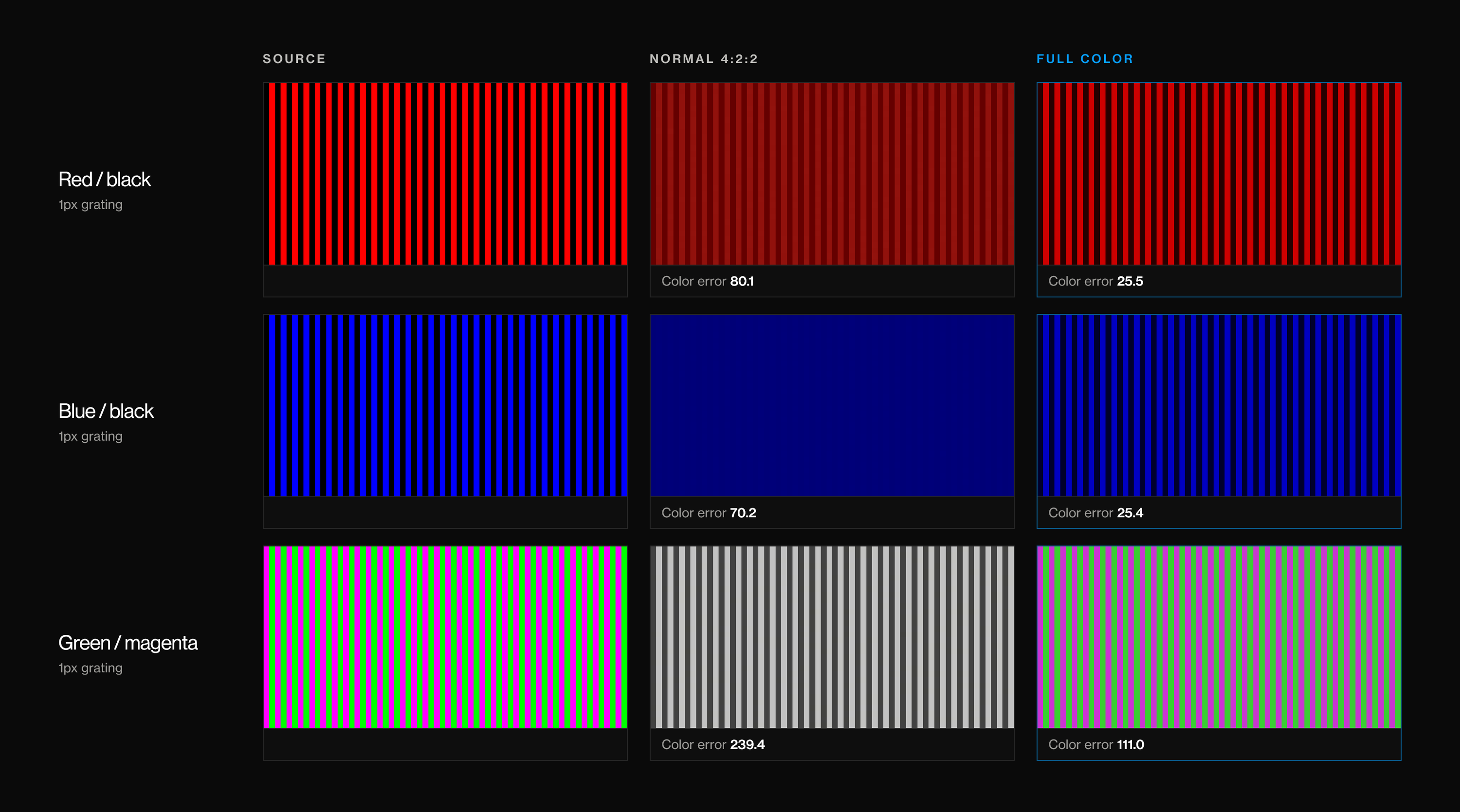
- Red/black: color error drops from 80 to 25. The red channel's swing across the grating reads 0 in normal capture, meaning the color is simply gone, and 87 in full color.
- Blue/black: color error drops from 70 to 25. In 4:2:2 the stripes vanish completely into flat navy.
- Green/magenta is the hardest case, because both color channels flip every pixel. Normal 4:2:2 scores a color error of 239 and turns it into gray stripes. Full color gets it to 111: the colors are back, but washed out. More on why under costs.
Colored text: what you actually see
Gratings are a torture test. Text is the part people notice, and it breaks the same way: a thin colored stroke is one or two pixels wide, so its edges share color samples with the background.
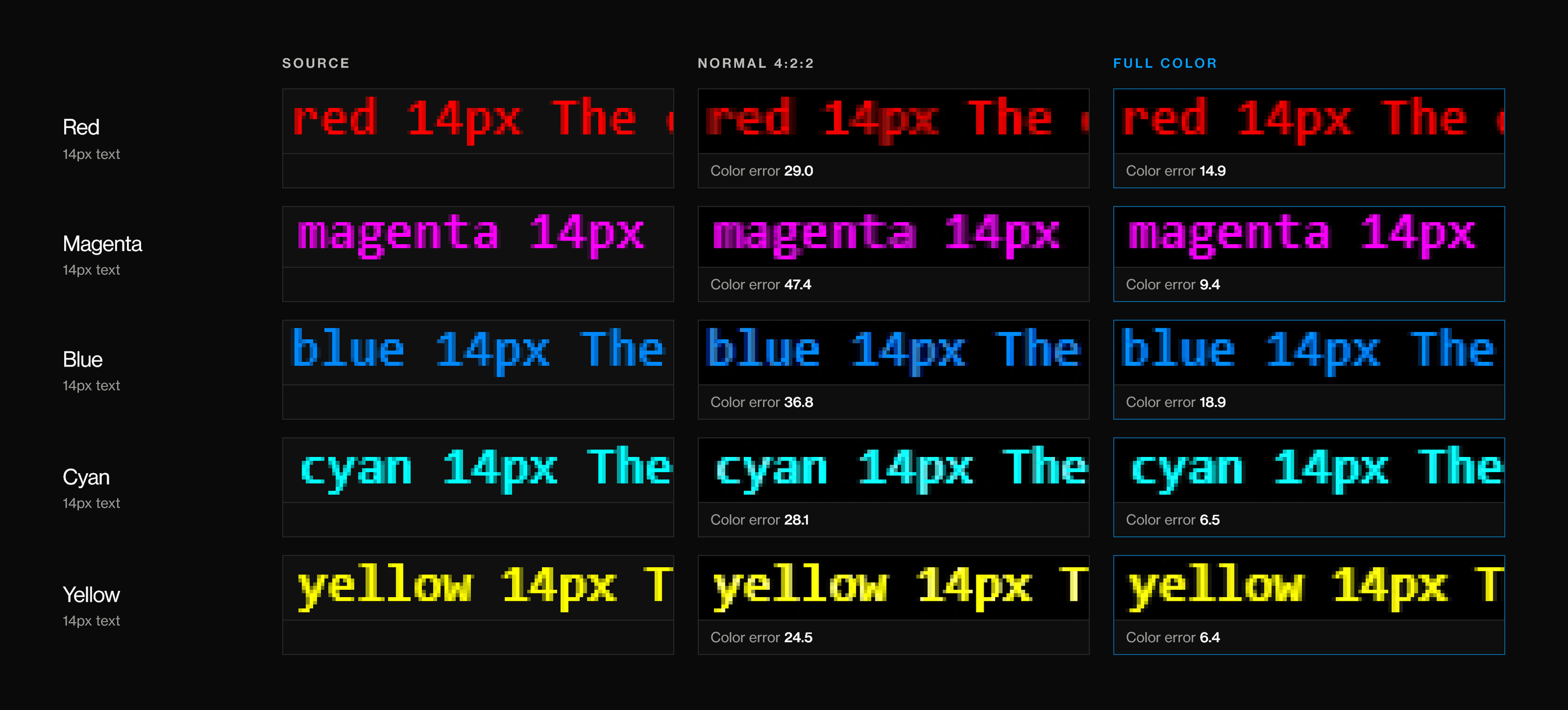
Color error on 14px colored text, by color (lower is better)
- Normal 4:2:2
- Full color
WarpKVM bench, RK628H on a Luckfox Aura, Sept 24 2026. Raw NV16 frames from the capture device at a 1080p60 input, streaming stopped. Mean |dU| + |dV| against the source pattern over each line's letter pixels, source converted as BT.709 through the capture chain's range expansion.
Show data table
| Normal 4:2:2 | Full color | |
|---|---|---|
| Red | 29 | 14.9 |
| Magenta | 47.4 | 9.4 |
| Blue | 36.8 | 18.9 |
| Cyan | 28.1 | 6.5 |
| Yellow | 24.5 | 6.4 |
The white-on-red badge from the top of the post scores 19.90 in normal 4:2:2 and 11.60 in full color on the white letters. The source pattern itself reads 4.64 there, because its smoothed letter edges are slightly pink, so full color removes a little over half of the error 4:2:2 adds.

Not every edge suffers. A color boundary that happens to land on an even pixel lines up with the pairs, so even 4:2:2 loses nothing there: our red/green block boundary scores 1.9 in normal capture and 3.6 in full color, both at the noise floor. The damage lands on edges that fall between pairs and on anything one pixel wide, which describes most text.
On the Luckfox Aura, full color is a live toggle, no reboot needed. The console flips it for you; underneath, it is one write to the driver's parameter, which is exactly how the captures above were taken:
echo 1 > /sys/module/rk628_csi/parameters/warpkvm_smuggle
Getting it to latch
The idea was the easy part. Making it lock reliably took more work. Doubling the width puts the link at 297 MHz, the same rate as 1080p at 120 Hz, and at those rates the RK628H's own mode detection is not always trustworthy: it can come back with an error, or with a timing that does not add up.
Two things in the driver handle that. When detection fails or returns a timing that is not coherent, the driver stops asking the chip and takes the answer from the EDID we loaded, because that EDID pins the source to its preferred timing anyway. And every time the chip re-latches, the driver pins the scaled 3840 target, so a re-latch can never quietly snap back to the source size:
csi->src_timings = *timings;
if (warpkvm_scaler_active(csi)) {
/*
* Runtime smuggle adopts the 3840 target; DT scaler-en keeps its
* probe-set csi->timings. Pin it so every re-latch holds the
* scaled destination instead of snapping back to the source size.
*/
if (warpkvm_smuggle && !csi->scaler_en)
csi->timings = smuggle_timing;
*timings = csi->timings;
}
What it costs
Nothing here is free, and this is the reason it is a mode instead of the default:
- About 7 ms more encode time, the figure our console shows next to the mode. The encoder is compressing a 3840-wide frame instead of a 1920-wide one.
- The 120 Hz bandwidth. Doubling the width uses the same link rate as 1080p120. On a single CSI port you get full color or high refresh, not both, and refresh rate is the biggest lever we have on latency (warpd #2). Two CSI ports can carry both at once, which is one more reason the WarpKVM 01 board routes both.
- 1080p only. At 4K the doubled rate is more than the link can carry. So 4K stays 4:2:2, which is genuinely hard to see at that pixel density. We will not market 4K as "full color", and nobody should run it inline at 4K expecting perfect text color.
- Some gratings recover only partly. The chip takes one color channel from even pixels and the other from odd ones, so a one-pixel phase offset lets one channel straddle a pair. On the RK628H that is the green/magenta grating (239 down to 111, not to the floor). It only shows on alternating one-pixel saturated patterns, which we have not run into in real desktop content.
So the rule we landed on: Low latency for everything where speed matters, Full color when the picture is the point, like driving a local monitor or reading colored text all day.
The honest ceiling
The local monitor is where full color should pay off most: the processor downscales the 3840-wide capture and drives the display from full color. We have measured the capture, not yet the picture on the local display itself.
The remote stream is more limited. It is still H.264 at 4:2:0, which halves color resolution vertically as well as horizontally. Encoding the 3840-wide frame keeps horizontal color at full resolution, which is the smear you actually see on text and badges, but a remote viewer does not get true 4:4:4, and that limit applies to any KVM that streams standard 4:2:0 H.264 to a browser. We are also still verifying that the browser scales the live full color stream back down correctly, so treat the remote side as work in progress.
If you are fighting a 4:2:2 bottleneck
- Look at where the scaler sits. If your capture chip scales before it subsamples, you may be able to buy back chroma with bandwidth.
- Measure with patterns built to break it. One-pixel gratings and white text on saturated color tell you more than any real image.
- Make the expensive fix optional. Full color costs latency and bandwidth, so we made it a mode, not a default.
Next up is the bigger lever: warpd #2, why refresh rate is the only lever on capture latency.