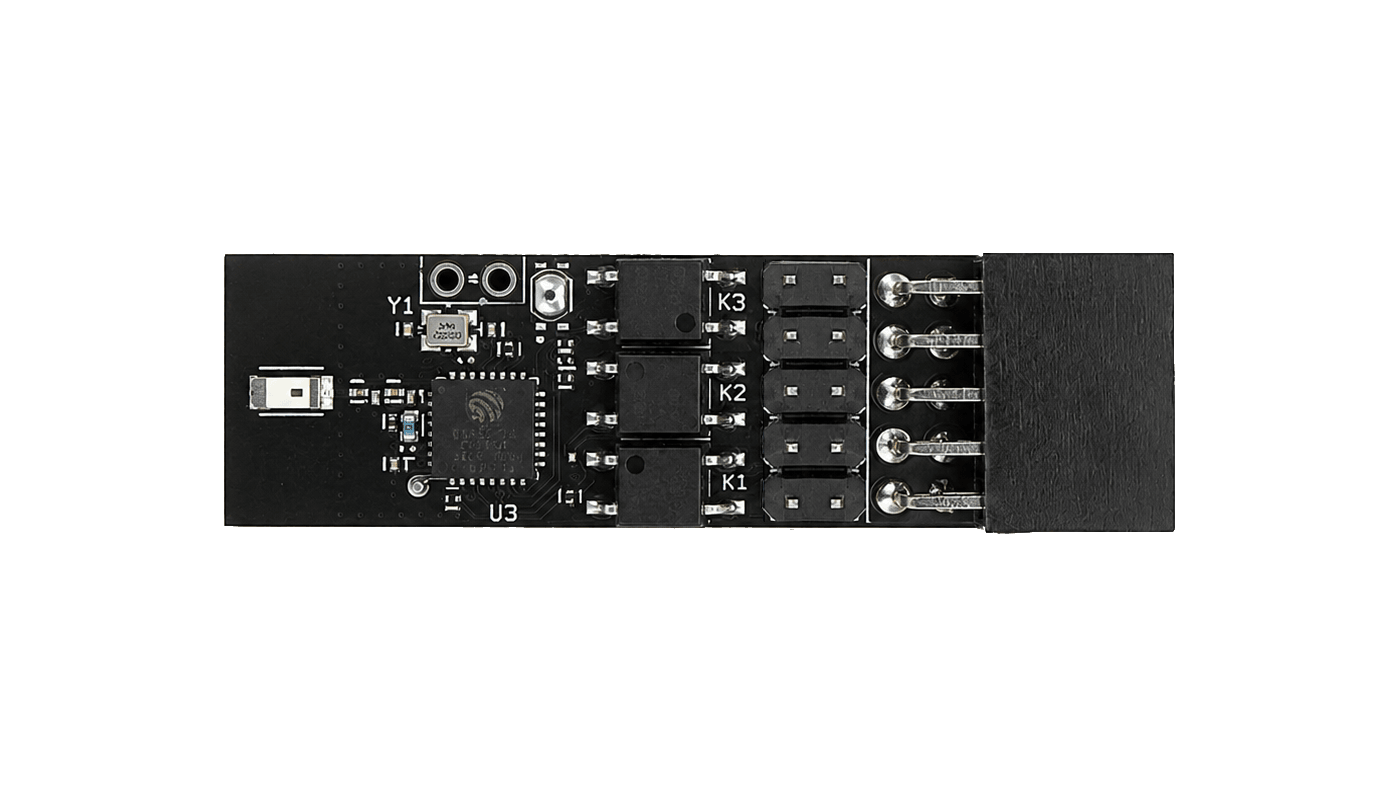
Power control add-on · Available to order
WarpKVM ATX Inline
Turn the machine on from your phone, wherever you are, even when it is fully shut down. Reset it or force it off when it freezes, and watch the front-panel LEDs respond live, so you know it worked without walking over. Built for the ASRock front-panel pinout; other boards by arrangement.
Made to order · built in 2 to 3 weeks · refundable until it ships · US shipping from $6.95
Compliance · FCC pending
FCC certification is pending. This card is currently sold for development and evaluation use. It has not yet been authorized under FCC rules, and general-use certification is in progress. We'll publish the grant here once it lands.
Capabilities
What it does.
Start it from anywhere
Power on a machine that is fully shut down, from the next room or another country. The card runs on standby power, so as long as the PSU has mains, the machine is reachable.
Bring back a hung machine
Reset it, or hold power for five seconds to force it off and start clean. The 2 am fix for a frozen box, without going to it.
Where Wake-on-LAN gives up
No NIC settings, no OS configuration, nothing that stops working when the machine hard-hangs or loses power. It is the physical button line, pressed electrically.
See that it worked
The card reads the power and drive LEDs it sits on, so the app shows the machine coming up, live, instead of leaving you to ping and hope.
Drops in line
Seats between the front-panel connectors and the board's 9-pin header in minutes, no soldering, and the case's own buttons keep working exactly as before.
Open firmware
Open source with signed updates, and a local REST and WebSocket API for scripts and integrations. No cloud in the control path.
Scope
What you get, and what you'll need.
In the box
One inline board, built and tested to your order, plus a T-splice for tapping the supply's 5 V standby wire. That is the whole shipment.
Not included
No jumper wires and no adapters. If your board does not follow the ASRock pin arrangement, get in touch before ordering.
You'll need
A board with the ASRock 9-pin front-panel pinout, a 2.4 GHz Wi-Fi network, and a phone with Bluetooth for the one-time setup.
Questions
Before you buy.
It is built for the ASRock 9-pin System Panel Header arrangement, which follows the common Intel front-panel layout. Many boards match it, but not all, and OEM machines often do not. Check your board manual against the pin table on the specifications tab. If your header differs, write to hello@warpkvm.com for a custom pinout, or re-pin the connection yourself with standard jumper wires.
Wake-on-LAN depends on the NIC and the OS being configured for it, and it tends to stop working exactly when you need it: after a hard hang, a power cut, or a full shutdown. It also cannot turn a machine off, and it never tells you whether anything happened. The card presses the physical power line from standby power and reads the LEDs back, so it works when the OS is gone and shows the result.
Yes. The front-panel connectors plug into the card and pass straight through to the board. The passthrough is passive, so the buttons work whether or not the card is powered or on the network.
Yes. The card runs from the ATX standby rail, which stays live while the PSU is switched on at the wall. It keeps its Wi-Fi connection with the machine off and can power it back up from the app.
No. Setup runs over Bluetooth, and control runs over your own Wi-Fi network. The card also exposes a local REST and WebSocket API if you want to script it.
You have 30 days from delivery to send it back for a full refund if it is unused and in its original packaging, and you can cancel for free any time before it ships. If a board arrives dead or fails in normal use within a year, we replace it and cover postage both ways. Full details in our returns policy.
Technical data
Specifications.
Control
- Functions
- Power tap · 5 s force-off · reset
- Telemetry
- Power LED and drive LED state, live
- Install
- Inline on the front-panel header, no soldering
- Passthrough
- Case buttons keep working, passive, even unpowered
Connectivity
- Wireless
- 2.4 GHz Wi-Fi + Bluetooth LE
- Setup
- Bluetooth pairing via the companion app, per-device setup code
- Control paths
- Companion app · local REST + WebSocket API
- Discovery
- mDNS, announces itself on your network
Compatibility
- Pinout
- ASRock 9-pin System Panel Header (PANEL1)
- Other boards
- Custom pinout on request, or re-pin with jumper wires
- Verify first
- Check your board manual against the pin table below
Power & build
- Source
- ATX 5 V standby rail · T-splice to input pin 10
- Host power
- Not required, controls a fully powered-down machine
- Firmware
- Open source with signed updates
Pinout
The header, pin by pin.
The ASRock 9-pin System Panel Header the card is built for, as documented in ASRock's own manuals. Pin 1 is the bottom-left position. Position 10 is the key on the motherboard header; on the card's input row it is a real pin, the 5 V standby input fed by the included T-splice.
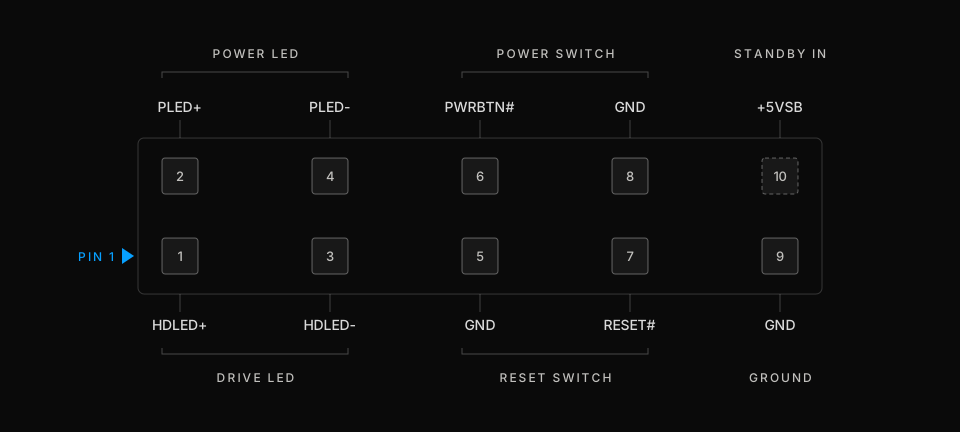
If your board manual shows a different arrangement, do not install the card as-is. Write to hello@warpkvm.com for a custom pinout, or re-pin with jumper wires per the setup guide.
Pinout
In line, not in the way.
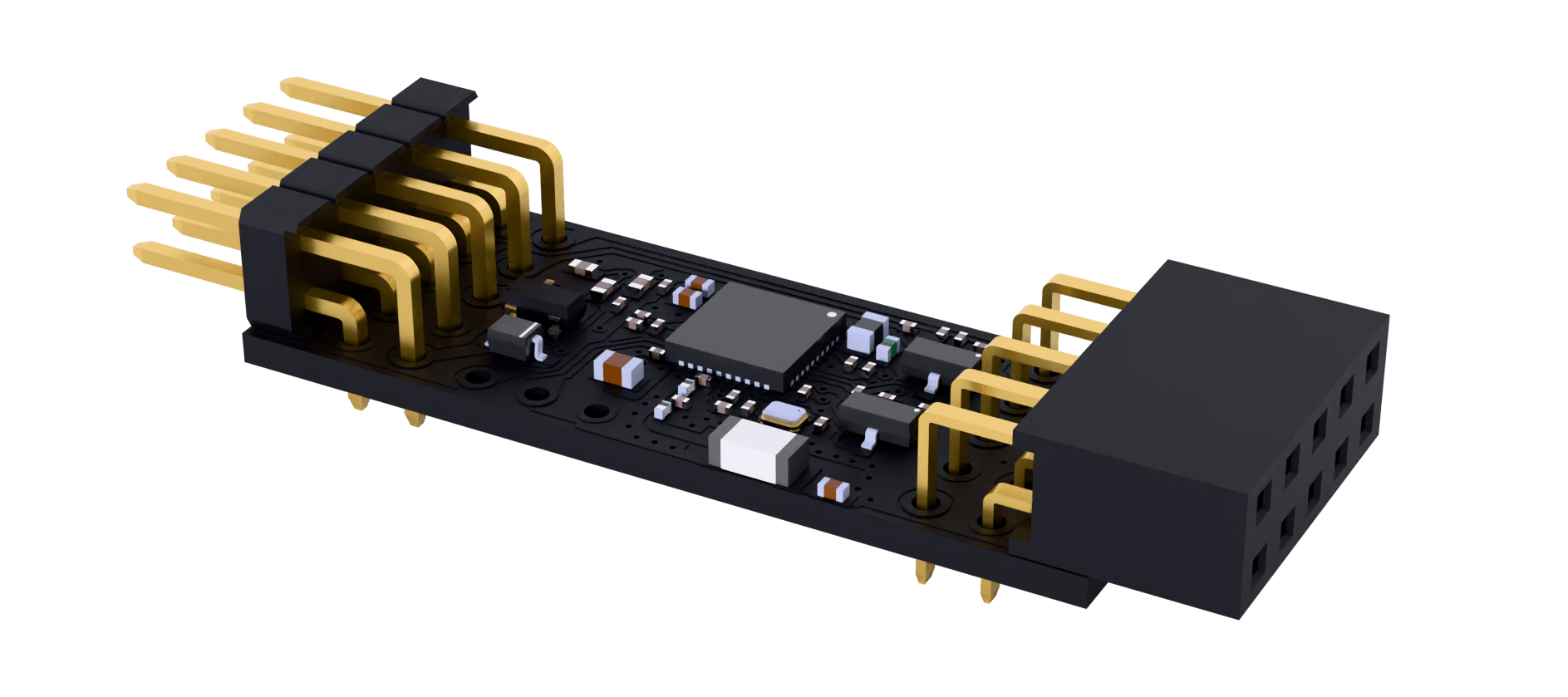
- Header pins
- To motherboard
- Wireless
- Wi-Fi + Bluetooth
- Passthrough
- Case buttons plug in
Read first
Documentation.
Everything we know about this board is published. If something you need is missing, ask and we will write it down.
