October 21, 2026Explainer
The IP KVM Capture Chip Database: TC358743 vs Lontium LT6911 vs MS2131
The one chip that decides an IP KVM's resolution ceiling and helps shape its latency, identified for every device we opened.
By Andrew Douglass · Founder
Disclosure: Our articles contain affiliate links, including Amazon. If you buy through one, we may earn a commission at no extra cost to you, and as an Amazon Associate we earn from qualifying purchases. It never affects our testing, measurements, or verdicts. Full disclosure.
An IP KVM capture chip is the component that turns the target computer's HDMI output into a digital video stream the device can encode and send over the network. It is the single part that most decides a KVM's maximum resolution and one of several things that shape its latency, yet no vendor lists it on a spec sheet. So we opened every device we own and identified it.
Across the whole market there are only three capture families in play: the Toshiba TC358743, the Lontium LT6911 series, and MacroSilicon USB dongles. Below is which chip sits in which device, and what each choice means for the picture on your screen.
The database
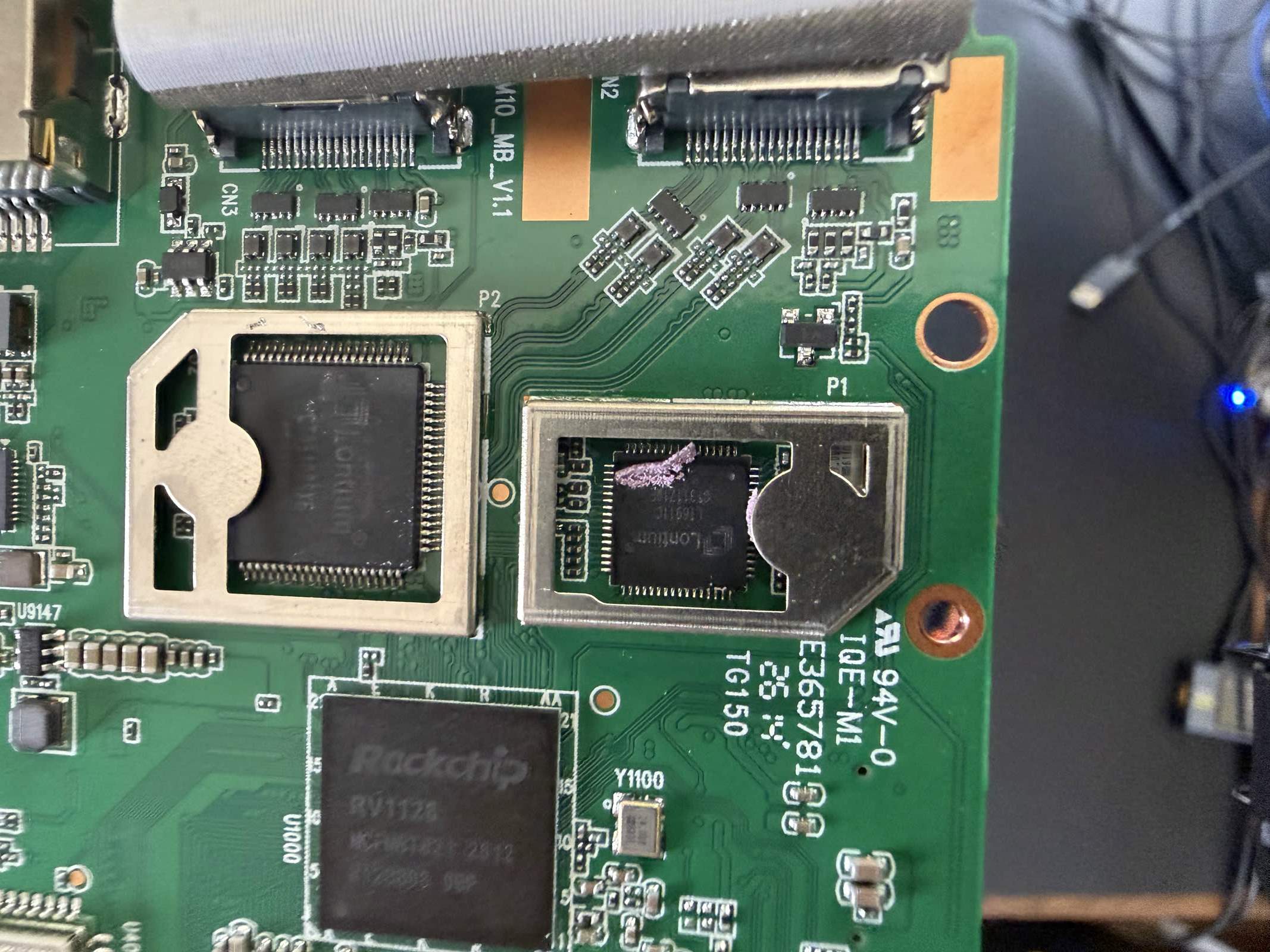
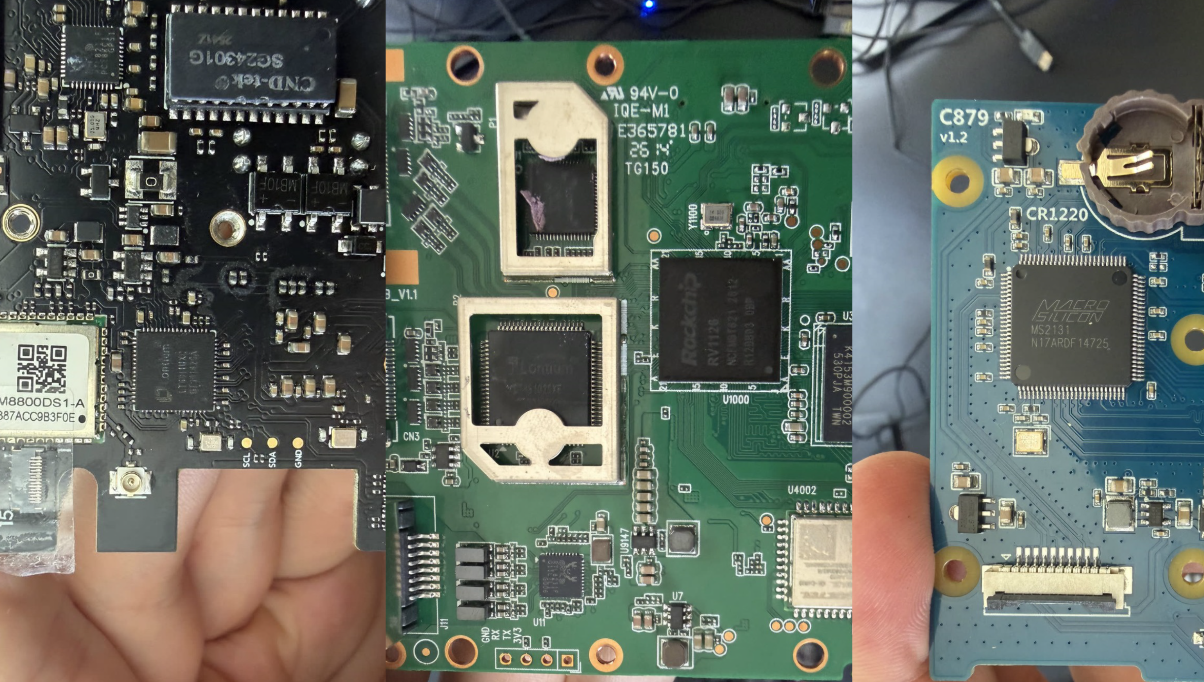
Every entry here is from a first-hand teardown, reading the chip markings and cross-checking the running kernel. The GL.iNet entries are marked likely because the board markings were partly obscured.
| Capture chip | Interface | Devices we found it in | Practical resolution ceiling |
|---|---|---|---|
| Toshiba TC358743(G) | HDMI 1.4 to MIPI CSI-2 | JetKVM, Luckfox Pico KVM, PiKVM V4 Plus, TinyPilot Voyager 3 | 1080p60 |
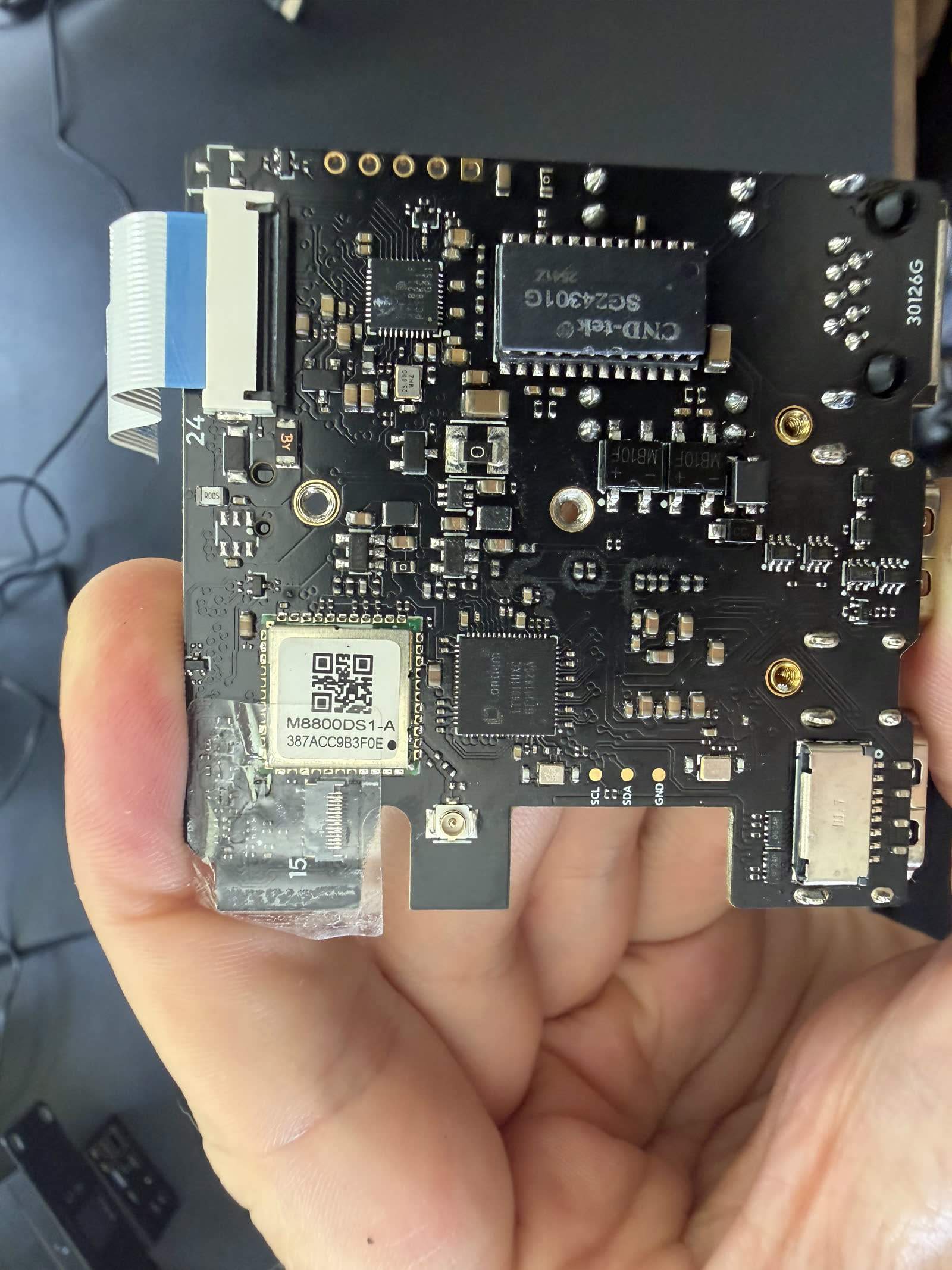
| Lontium LT6911UXC | HDMI to MIPI CSI-2 | Sipeed NanoKVM Full, Pro, and PCIe | up to 4K (SoC dependent) |
| Lontium LT6911C (likely) | HDMI to MIPI CSI-2 | GL.iNet Comet, GL.iNet Comet Pro | 1080p to 4K30 |
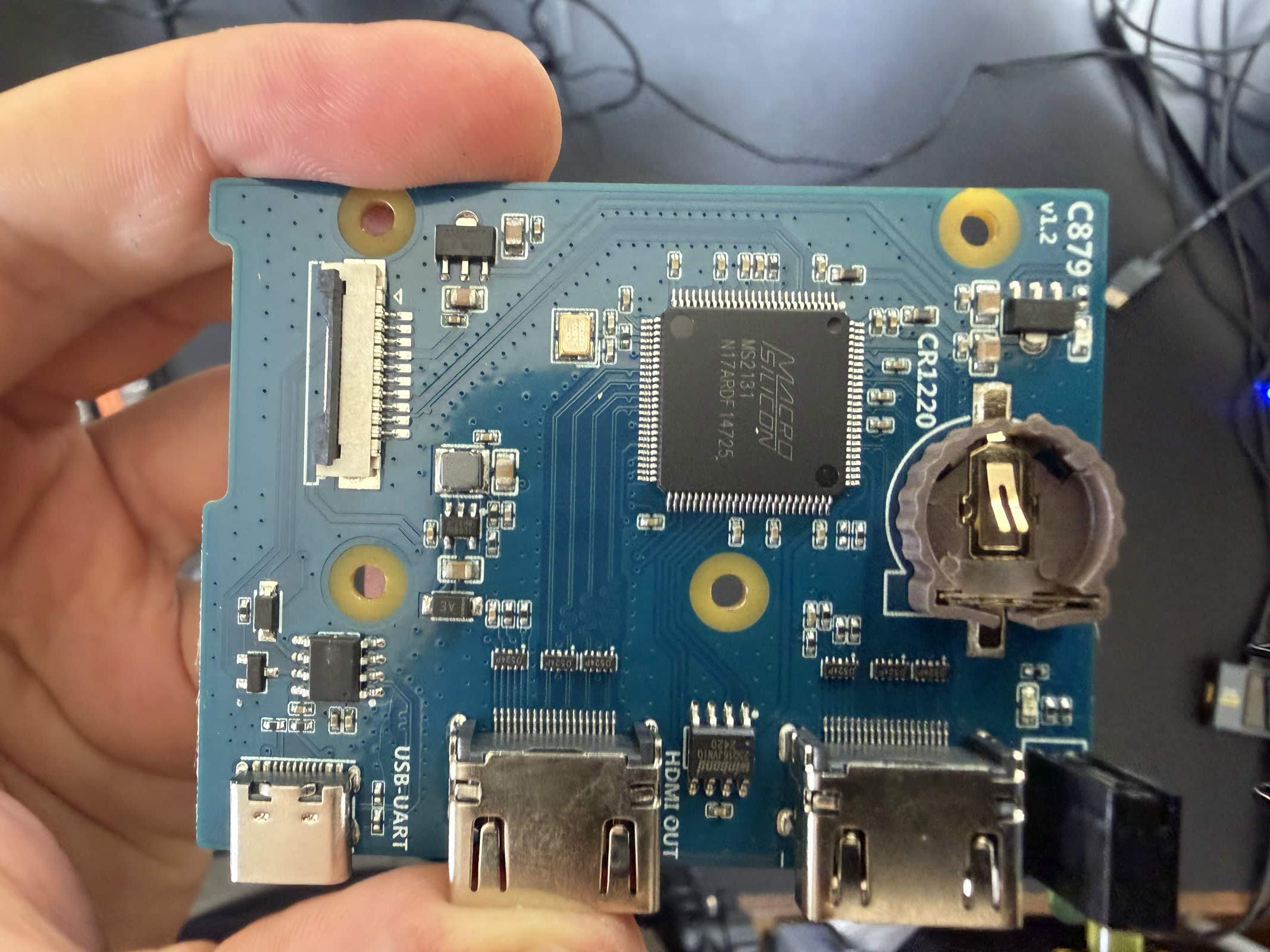
| MacroSilicon MS2131 | HDMI to USB 2.0 | BliKVM (Allwinner variant) | about 1080p30 |
The single most useful takeaway: the capture chip, not the processor, sets the resolution ceiling. Four different devices with four different processors all top out at 1080p for the same reason. They all run a Toshiba TC358743.
Toshiba TC358743: the 1080p workhorse
Datasheet: Toshiba TC358743XBG. Toshiba publishes the full part in the open, which is part of why this chip shows up in so many designs.
The Toshiba TC358743 is the most common capture chip in the field. We found it in the JetKVM, the Luckfox Pico KVM, the PiKVM V4 Plus, and the TinyPilot Voyager 3. It is a mature HDMI-to-MIPI-CSI-2 bridge: it takes an HDMI signal, handles the EDID handshake, and hands the SoC a clean CSI-2 stream that the SoC's hardware encoder turns into H.264.
Its one hard limit is that it implements HDMI 1.4, which is why every device using it caps at 1080p. There is no firmware update or faster encoder that gets a TC358743-based KVM to 4K. That is the chip. It is a sensible choice for a 1080p device: well understood, well supported in the Linux kernel, and paired naturally with the Raspberry Pi CM4's CSI input. The deeper mechanics are in our guide to HDMI-to-MIPI-CSI bridges.
The interesting wrinkle here is that the JetKVM and Luckfox use the same TC358743 as the PiKVM and TinyPilot, despite running much smaller processors. So the "budget" and "premium" 1080p devices share the exact part that limits them all to 1080p.
Lontium LT6911: the path to 4K
Product brief: Lontium LT6911UXC. Lontium publishes a summary rather than a full public datasheet, so the detailed register-level documentation is not something you can read before buying.
The Lontium LT6911 series is the more capable bridge, and it is what shows up in devices that reach past 1080p. All three Sipeed NanoKVMs (the Full, the Pro, and the PCIe) use the LT6911UXC. On the NanoKVM Pro, paired with a capable Axera SoC, that is how the device reaches 4K capture. The NanoKVM Full also carries a second Lontium part, an LT86102UXE, which is a 1x2 HDMI splitter used to provide a loop-out so a local monitor can share the source.
We also found what appears to be a Lontium LT6911C on both the GL.iNet Comet and Comet Pro, though the markings were hard to read, so treat that as likely rather than confirmed. That family fits: the Comet Pro is a 4K30-class device, and a Lontium bridge is the usual way a Rockchip-based KVM gets there. Our NanoKVM review covers how that capture path performs in practice.
MacroSilicon MS2131: the USB shortcut
Datasheet: MacroSilicon MS2131. MacroSilicon's own site is HTTP only, so this is the copy distributors host.
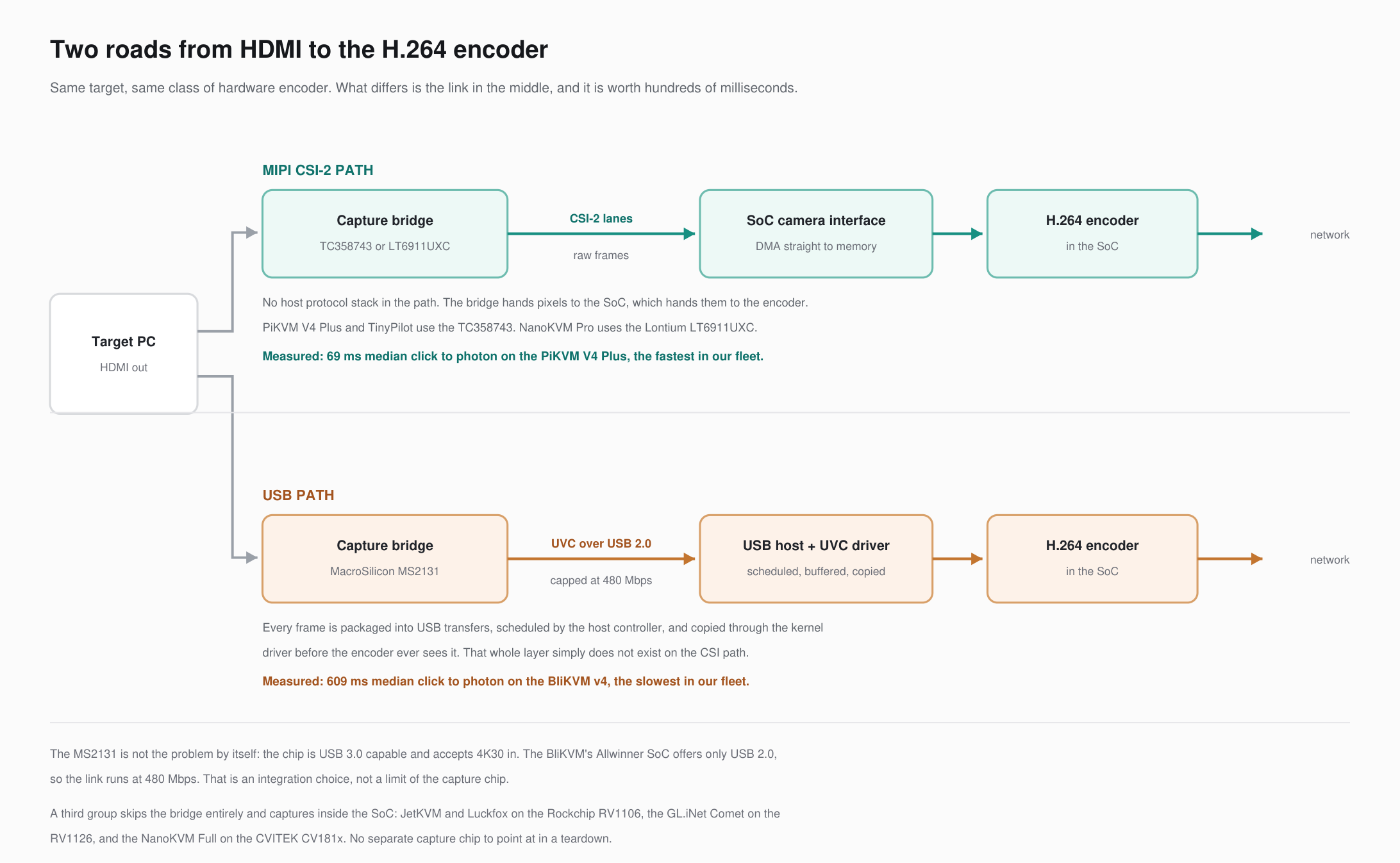
The BliKVM we tested takes a different route entirely. Instead of a MIPI-CSI bridge wired directly to the SoC, it captures HDMI through a MacroSilicon MS2131, a USB capture chip. This is the same class of part you find in cheap "HDMI capture sticks." The MS2131 is actually USB 3.0-capable, but the BliKVM's Allwinner H616-family SoC has no USB 3.0, so it runs the chip over USB 2.0.
The consequence shows up in the numbers. A USB 2.0 link has far less bandwidth than a direct CSI-2 connection, which caps this design around 1080p30. The BliKVM was also the slowest device in our latency testing at its best setting: 185.9 ms glass to glass at 1080p60 on scrolling text in MJPEG (84.3 ms on a still screen), and 688 ms on scrolling text (572 ms on a still screen) in H.264, which on this board is software encoded. The USB 2.0 capture path is likely part of the story, but the encoder matters as much here, so we cannot attribute the gap to the capture chip alone. A USB capture chip is cheap and flexible, but it comes with trade-offs on a KVM. The numbers are in our IP KVM latency benchmarks, and the full picture is in the BliKVM review.
Updated October 2026: re-measured on our new glass-to-glass rig at each device's best settings; why the numbers changed. To feel these delays rather than read them, try our latency page.
Why the capture chip matters more than the spec sheet
Three practical lessons come out of this database.
First, the capture chip sets the resolution ceiling. If a device runs a TC358743, it does 1080p, full stop, regardless of how fast its processor is. If you need 4K, you need a device built around a Lontium LT6911 or similar, paired with an SoC that can encode it.
Second, the capture interface can shape latency, but it is not the whole story. A direct MIPI-CSI-2 connection (TC358743 or Lontium into the SoC) avoids a USB hop and the buffering of a USB capture chip. In our October 2026 testing, though, the encoder and software mattered at least as much: the CSI-based devices span from the low 50s of milliseconds to about 145 ms at their best settings depending on encoder and firmware. The slowest device we tested was the one that captured over USB, but it also software-encodes H.264, so we cannot pin its result on the capture chip alone.
Third, shared chips mean shared limits. Because the same handful of chips appear across many brands, devices that look very different on paper often share the exact component that constrains them. Knowing the chip tells you more about real performance than the marketing does. For the engineering behind all of this, see how HDMI capture works inside an IP KVM.
FAQ
The JetKVM uses a Toshiba TC358743, the same HDMI-to-MIPI-CSI-2 bridge found in the PiKVM V4 Plus, the TinyPilot Voyager 3, and the Luckfox Pico KVM. It is an HDMI 1.4 part, which is why the JetKVM tops out at 1080p.
Because they share the same capture chip. The Toshiba TC358743 implements HDMI 1.4 and cannot pass 4K, so any device built around it is limited to 1080p no matter how capable its processor is. Reaching 4K requires a different bridge, such as a Lontium LT6911, plus an SoC that can encode it.
No capture chip decides latency on its own. The direct MIPI-CSI-2 bridges (Toshiba TC358743 and Lontium LT6911) avoid the extra USB hop, and every fast device we tested uses one. But encoder and firmware matter at least as much. In our October 2026 testing the only device that captured over USB, a MacroSilicon MS2131 run at USB 2.0 speeds in the BliKVM, was the slowest, though it also software-encodes H.264, so the chip is only part of the explanation.
You have to open it and read the chip markings, or check what the Linux kernel loads. Vendors do not publish the capture chip. Our database above lists what we found in each device from first-hand teardowns.
This database is built from our own teardowns; chip identifications come from reading board markings and the running kernel, with the GL.iNet parts marked likely where markings were unclear. Disclosure: this guide is published by WarpKVM, which is developing an IP KVM of its own.