October 21, 2026Review
Luckfox PicoKVM Review: The JetKVM Clone, Tested
Same silicon, same capture chip, copied software, a third of the price. We benched the clone against the original to see where the $38 price shows up.
By Andrew Douglass · Founder
Disclosure: Our articles contain affiliate links, including Amazon. If you buy through one, we may earn a commission at no extra cost to you, and as an Amazon Associate we earn from qualifying purchases. It never affects our testing, measurements, or verdicts. Full disclosure.
This Luckfox PicoKVM review answers the question the device begs: what do you actually give up buying the $38 clone instead of the $103 JetKVM? We own both, so we measured both on the same rig, opened both, and ran them side by side. The probe results are blunt: the PicoKVM is built from the JetKVM's parts list, the same SoC and the same capture chip on a board of Luckfox's own layout, running a fork of JetKVM's open-source software. And on our bench, the clone was slower: 90.0 ms glass to glass against the JetKVM's 59.8 ms. The corners it cuts are real, and speed is one of them.
The verdict up front
What it is, and who makes it
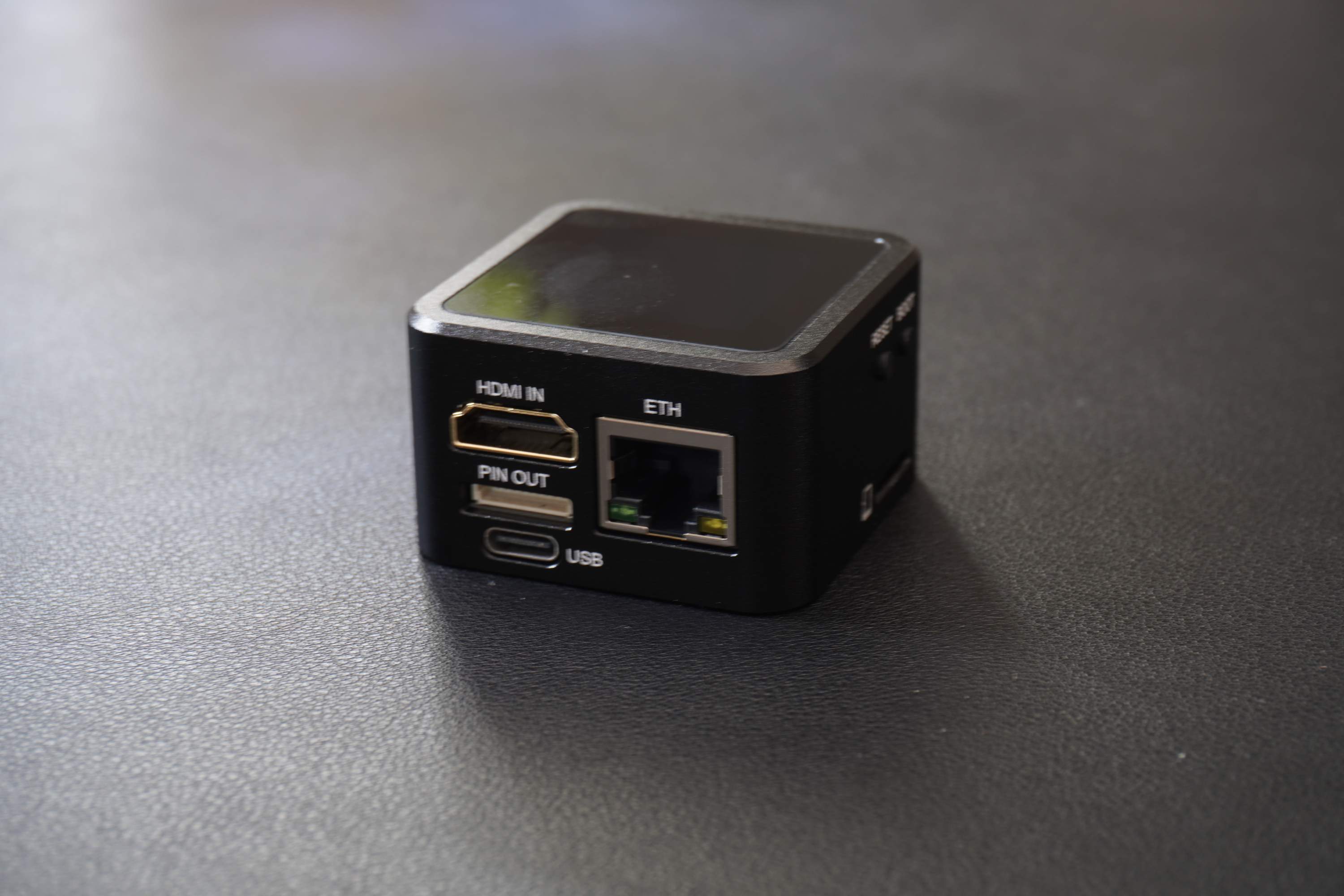
The PicoKVM is a KVM over IP device: plug it into a machine's HDMI out and a USB port and you get browser-based keyboard, video, and mouse control at the hardware level, working in BIOS, boot menus, and OS installers where remote-desktop software cannot. It comes from Luckfox, a Shenzhen board maker founded in 2020 and best known for its Pico line of Rockchip dev boards, distributed closely through Waveshare. Two versions exist: a bare base model at $37.99 direct (before shipping and tariffs; $86 on Amazon) and a "full" version, for more, that adds a 1.54-inch touchscreen and a metal case, per the launch coverage at CNX Software.
The clone finding: what our probe showed
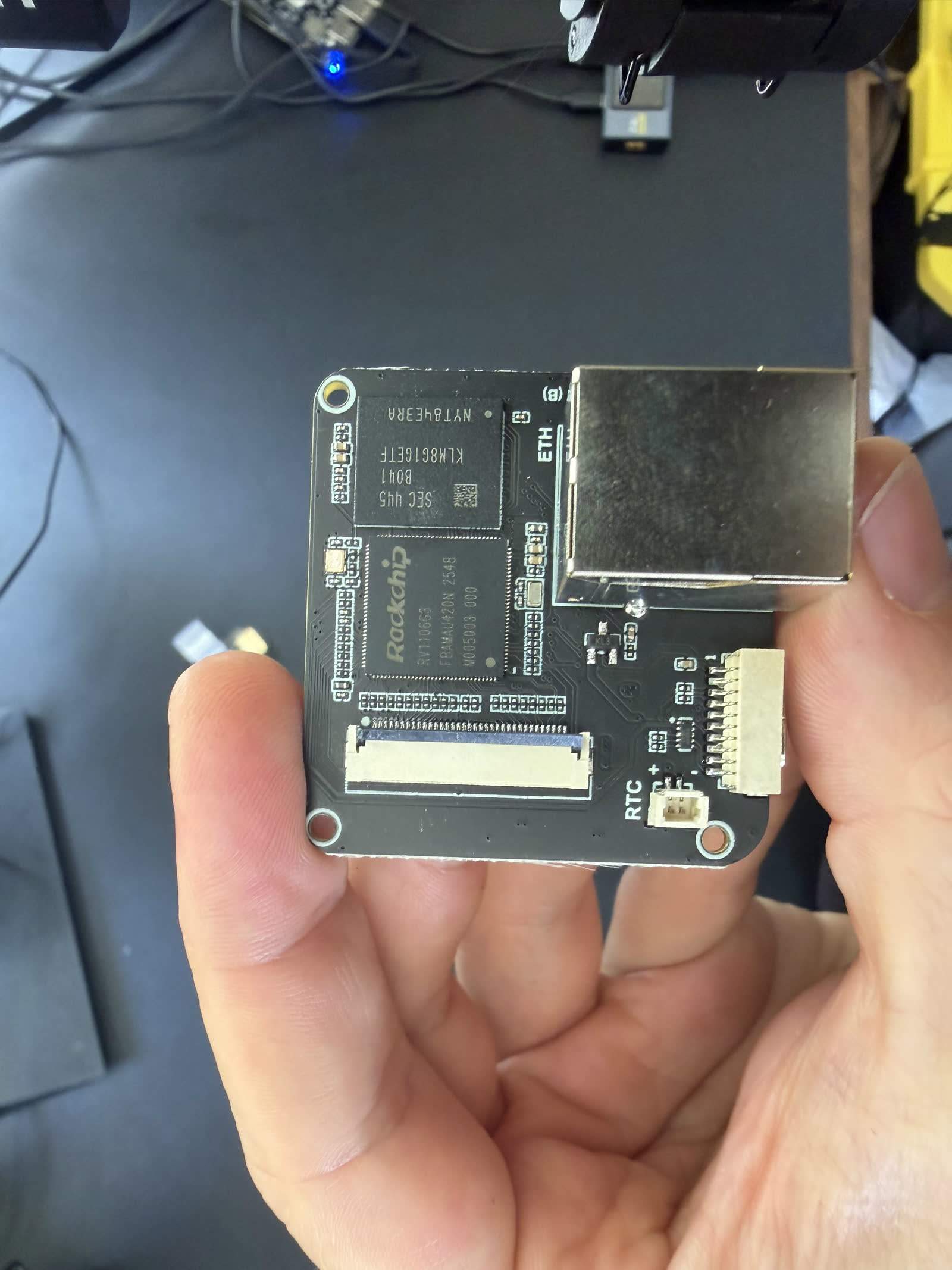
We put a root shell on our unit, and the result removes all doubt about the family tree. The PicoKVM runs the same Rockchip RV1106G3 as the JetKVM, with the same kernel and Buildroot base, the same Rockchip hardware encoder, and an identical target-facing USB profile. Our teardown found the same Toshiba TC358743G capture bridge, which is the chip that gives both devices their 1080p ceiling. The web interface and settings menus are visibly JetKVM's, because the firmware is a fork of JetKVM's GPL open-source repository; reviewers who checked the fork found a handful of giant code drops rather than active development, and version numbers still sitting at 0.0.x. That is all legal under the license, and Luckfox nowhere advertises the lineage.
The boards are not copies of each other, though: the PicoKVM spreads its capture chip and its SoC across two PCBs joined by a ribbon, where the JetKVM fits everything onto one. The difference that will actually reach you is storage, and it is a telling one. The JetKVM ships a removable 32 GB SanDisk microSD. Our PicoKVM has a soldered 8 GB Samsung eMMC with a September 2018 date code: a seven-year-old old-stock chip in a currently shipping product. Its health registers read fresh and unused, so this is surplus sourcing rather than recycling, but it is exactly the kind of corner a $38 price demands. Our PicoKVM teardown has the board photos, and our storage provenance report puts that chip in context across the whole fleet.
Setup and daily use
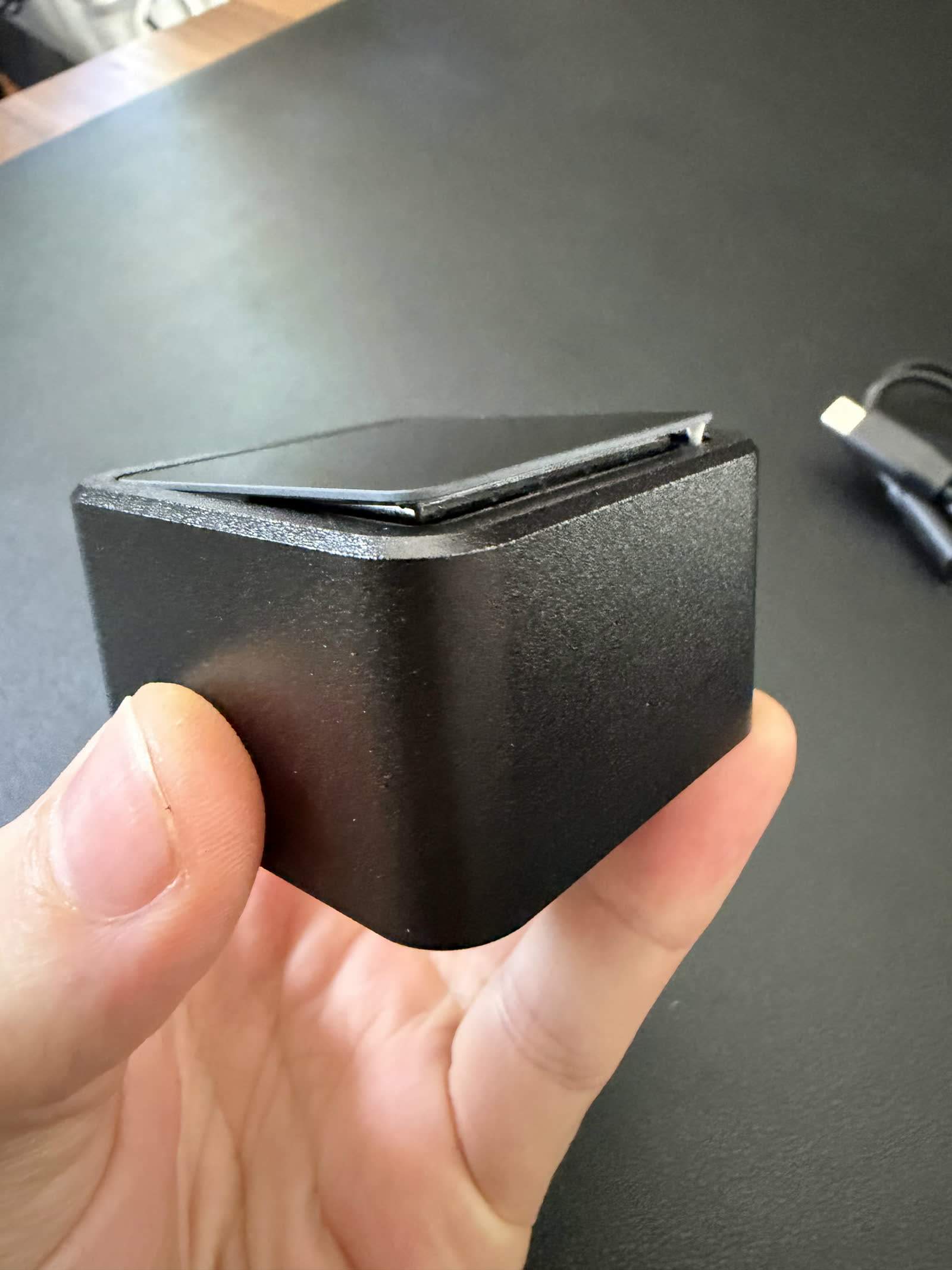
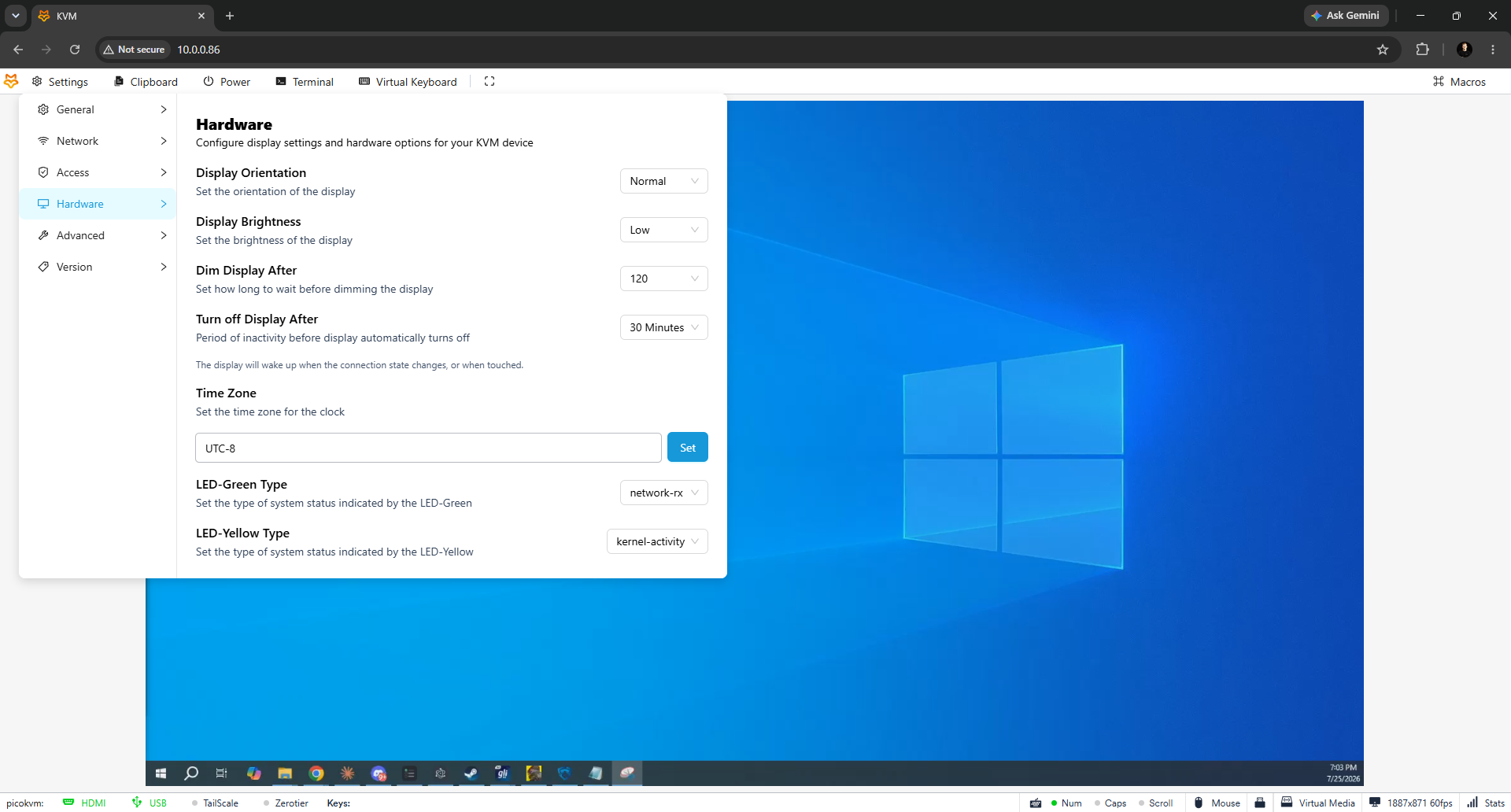
Our stopwatch ran 2 minutes 37 seconds from sealed box to a working stream, mid-pack for the ten devices we have set up. The friction is in the details. The touchscreen, the thing you pay the extra $25 for, does not show the device's IP address; ours popped a file-browser view instead, so we found the IP from the router like it was 2005. The clock shipped in the wrong timezone. Like the JetKVM, it wants a USB power splitter if your machine cuts USB power when off, and there is no battery fallback. And our unit's screen adhesive is already lifting at one corner, which matches an owner report of displays popping loose as the device warms up.
In use, it is the JetKVM experience one firmware generation behind: clean stream, working virtual media, keyboard macros, Wake-on-LAN, and Tailscale and ZeroTier for remote access without port forwarding (use them; our security guide explains why). The rough edges reviewers documented match what we saw: the paste-to-target function can drop characters in long text, the on-screen keyboard cannot latch modifier keys so combos need macros, and BIOS access is machine-dependent, with some systems black-screening at the boot menu with the PicoKVM attached while others sail through. Our test hardware behaved, but two of the three video reviewers we analyzed hit at least one incompatible machine.
Performance: the clone trails the original
Here is the number that decides the comparison. On our glass-to-glass rig in October 2026 (two identical monitors on an HDMI splitter, a light sensor on each, median of 300 measurements per side, 1080p60 over wired LAN, each device at its best settings on current firmware), the PicoKVM measured 90.0 ms on scrolling text at Stream Quality Low, and 77.4 ms on a still screen. Stream Quality High froze 13 % of frames on text, so Low is its best setting. The JetKVM, on the same silicon and the same capture chip, measured 59.8 ms (52.0 ms on a still screen) at its Quality Low, so the clone is about 30 ms slower. Software is the likeliest reason. The JetKVM we tested ran its latest app release (0.5.9), while the PicoKVM runs Luckfox's own fork of JetKVM's software, which had not caught up with those updates. The hardware is the same, so a Luckfox firmware update that pulls in JetKVM's recent work could close much of the gap. We have not isolated the cause, and we will re-measure when Luckfox ships one. It did match the JetKVM on power within a rounding error: 1.52 W streaming against 1.53 W, third most efficient of our fleet behind the two RISC-V NanoKVMs.
Keep the number in context: 90.0 ms puts it behind the NanoKVM Pro (53.3 ms), the GL.iNet Comet (54.1 ms), the PiKVM V4 Plus (57.3 ms), and the JetKVM (59.8 ms), though still ahead of the NanoKVM Full (144.8 ms), and video tops out at 1080p60 like every TC358743 device. Quality at 1080p is clean, and reviewers found it fine for admin work and too laggy for gaming, which is true of this whole category. Full data in our latency benchmarks, the method in our latency testing writeup, and the power comparison.
The PicoKVM at 90.0 ms, about 30 ms behind the JetKVM it copies
Measured October 16 to 20, 2026 on our two-sensor glass-to-glass rig: 1920x1080 at 60 Hz, LG 27G810A monitors, Chrome on Windows 10 over wired gigabit LAN. Video path only. The PicoKVM and JetKVM were each run at Quality Low, their lowest-latency setting. The other devices we measured are in the latency benchmarks linked above.
Show data table
| Device | Measured median |
|---|---|
| NanoKVM Pro | 53.3 |
| GL.iNet Comet | 54.1 |
| JetKVM | 59.8 |
| Luckfox PicoKVM | 90 |
| NanoKVM Full | 145 |
The storage problem in practice
That 8 GB eMMC is not just a provenance curiosity; it is the device's biggest practical limit. After the OS takes its share, under 5 GB remains for virtual media, which is too small for a Windows ISO or a current Ubuntu installer. One reviewer watched an Ubuntu upload silently hang with 16 MB free. There is a microSD slot to extend storage, so the fix costs a few dollars, but know that the out-of-box virtual media only really fits slim ISOs like Alpine or netinstall images.
“Unless you're using Alpine or a stripped down distribution, the internal storage is going to be completely useless to you. You're going to have to add an SD card to store your favorite distros.”
What owners say
Across three video reviews, 50 owner comments, and 8 reddit threads we analyzed, the pattern is consistent: people buy it because it is astonishingly cheap (one owner: "Just ordered one for £24 after cashback... Steal!"), they find the core KVM job works, and the complaints pile up in the second week: the boot-menu incompatibilities, the storage ceiling, the paste errors, and an update mechanism that stuck for one reviewer. The expansion pin-out that reviewers dismissed as useless now has an answer: Waveshare lists a PicoKVM Ext board that mounts in a PCIe slot and adds remote power management, though the base unit still ships without any power-control accessory.
Price and alternatives
| Device | Price | Max capture | Glass-to-glass latency (our bench) | Streaming power |
|---|---|---|---|---|
| Luckfox PicoKVM | $38 to $86 | 1080p60 | 90.0 ms | 1.52 W |
| JetKVM | ~$103 | 1080p60 | 59.8 ms | 1.53 W |
| Sipeed NanoKVM Full | ~$55 | 1080p60 | 144.8 ms | 1.17 W |
| GL.iNet Comet | ~$90 | 2K60 | 54.1 ms | 1.85 W |
| Sipeed NanoKVM Pro | ~$155 | 4K45 | 53.3 ms | 2.22 W |
Against the JetKVM, the extra $65 or so buys you about 30 ms less video delay, an actively developed firmware with a real roadmap, a company that answers issues, a removable quality SD card, a growing extension ecosystem, and industrial design that does not shed its own screen. Our JetKVM vs Luckfox head-to-head scores that fight in full. Against the NanoKVM Full at $55, the PicoKVM is faster and its software lineage is at least a fork of something good. And if you can stretch to $90, the GL.iNet Comet is the quickest KVM at this end of the market.
FAQ
FAQ
Functionally, yes. Our root-shell probe found the same Rockchip RV1106G3, the same Toshiba capture chip, and firmware forked from JetKVM's GPL open-source repository, with JetKVM's UI largely intact. The boards differ: the PicoKVM spreads the same parts across two PCBs where the JetKVM uses one. That is legal under the license; Luckfox just does not mention it.
$37.99 for the base version direct, before shipping and tariffs, and $86 on Amazon (October 2026). The full version with the touchscreen and metal case costs more. Since the screen does not even show the IP address, the base version is the sensible buy.
Not out of the box; it has Wake-on-LAN and an expansion pin-out but ships with no power-control accessory. Waveshare now sells a separate PicoKVM Ext board that mounts in a PCIe slot for remote power management. For hard power control without that, look at the JetKVM's ATX extension or GL.iNet's ATX board.
Yes, it inherits Tailscale and ZeroTier support from the JetKVM firmware it forks, so you can reach it remotely with no port forwarding. That is the way to expose it; never put a $38 KVM's login page on the open internet.
No. At 90.0 ms measured glass-to-glass latency it trails the JetKVM (59.8 ms), and every device in this category is built for administration, BIOS access, and rescue work, not real-time play. Reviewers who tried games found it usable to watch, laggy to play.