October 21, 2026Buying guide
Best JetKVM Alternatives in 2026 (Tested)
Seven JetKVM alternatives ranked from hands-on testing: PiKVM, GL.iNet Comet, NanoKVM, TinyPilot, and the niche picks worth knowing.
By Andrew Douglass · Founder
Disclosure: Our articles contain affiliate links, including Amazon. If you buy through one, we may earn a commission at no extra cost to you, and as an Amazon Associate we earn from qualifying purchases. It never affects our testing, measurements, or verdicts. Full disclosure.
The best JetKVM alternatives in 2026 are the GL.iNet Comet (better price, comparable polish), the Comet Pro (more features and 4K@30), PiKVM V4 (deeper capabilities), Sipeed NanoKVM (cheaper), and TinyPilot Voyager 3 (premium support). Which one actually beats the JetKVM depends on why you are leaving it, so this guide ranks them by the reason.
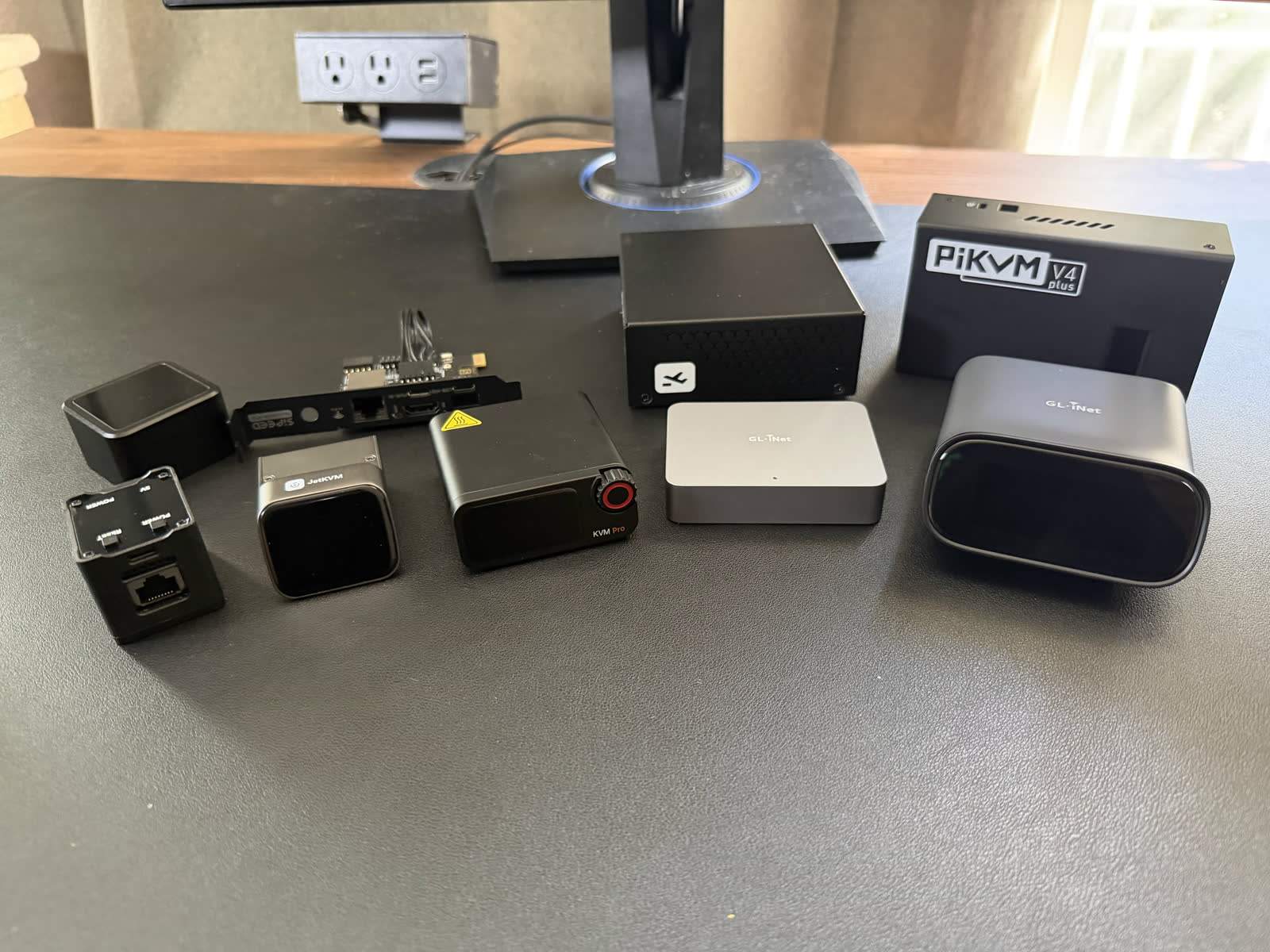
We own and test all of these devices; the rankings below come from our bench, not spec sheets. Jeff Geerling's 2026 sweep of the whole category is the other hands-on reference worth reading; our conclusions mostly agree, with differences noted.
Why look beyond JetKVM
JetKVM earned its default status: $69, 1080p60 WebRTC, clean UI, open source. The honest reasons to shop elsewhere: you need more than 1080p, you want PoE without an add-on, you need multiport or HDMI passthrough, you hit its browser quirks (Safari has been a recurring complaint on r/homelab), or you simply want a vendor with a longer hardware track record. Each alternative below wins on at least one of those axes.
1. GL.iNet Comet: best all-around alternative
2. GL.iNet Comet Pro: most features per dollar
3. PiKVM V4: most capable, most open
4. Sipeed NanoKVM: cheapest way in
5. TinyPilot Voyager 3: premium support play
6. BliKVM and LuckFox PicoKVM: the niche picks
BliKVM runs PiKVM's open-source software on alternative hardware, including a PCIe card that lives inside the machine it controls, drawing power from the host slot. If you want PiKVM's stack without PiKVM's price, or an internal form factor, it is the credible third-party build. LuckFox PicoKVM is the budget JetKVM look-alike; Geerling's testing found it serviceable but a clear step down in software quality. Both are fine purchases with eyes open, and both reinforce the pattern: the open PiKVM/JetKVM software ecosystems are where the category's innovation happens.
Price comparison
| Device | Street price | Max capture | HDMI passthrough | ATX control | PoE | Open source |
|---|---|---|---|---|---|---|
| JetKVM (baseline) | $69 | 1080p60 | No | Via extension | No | Yes |
| GL.iNet Comet | $99.99 | 4K@30 | No | Accessory | Yes ($115.99 model) | Partly |
| GL.iNet Comet Pro | $179.99 | 4K@30 | Yes | Accessory | No | Partly |
| PiKVM V4 Mini / Plus | $269.95 / $384.95 | 1920x1200@60 | Plus only | Yes | No | Yes (GPLv3) |
| NanoKVM Full / PCIe | $40 to $87 | 1080p60 | No | Yes (Full) | No | Partly |
| TinyPilot Voyager 3 | ~$400 | 1080p60 | No | Optional | Yes | Partly |
Features and specifications: what actually separates them
- Video resolution and frame rate. Everything here is 1080p60-class in daily use; the Comets capture 4K at 30fps and the NanoKVM Pro reaches 4K@45. No alternative, and no JetKVM, does 4K@60; that gap is its own story. (Disclosure: our upcoming WarpKVM targets exactly that spec.)
- Remote access methods. Tailscale is table stakes: JetKVM, Comet, and PiKVM integrate it directly. Treat any device without a sane VPN/overlay path as LAN-only.
- Web interface. JetKVM and Comet feel like consumer software; PiKVM and BliKVM feel like infrastructure tools; NanoKVM sits awkwardly between.
- Form factor and design. JetKVM's tiny touchscreen puck remains the nicest object; the PCIe cards (BliKVM, NanoKVM) disappear entirely; PiKVM's steel boxes rack cleanly.
- Security considerations. After 2026's audit wave, update cadence and firmware transparency are ranking criteria, not footnotes. Whatever you buy: no port forwarding, overlay network, isolated VLAN. Full hardening guide here.
Setup and installation
Every device above follows the same fifteen-minute pattern: HDMI in, USB to host, Ethernet, browser. The differences are at the edges: Comet's Wi-Fi setup makes cable-free installs possible, PiKVM rewards (and eventually demands) SSH literacy, NanoKVM needs a firmware update before anything else. The pillar guide covers the general flow.
FAQ
FAQ
Similar core capability (browser-based remote control, 1080p-class streaming, Tailscale). The Comet adds 4K@30 capture, a PoE variant, and an accessory ecosystem; JetKVM counters with a lower price, fully open firmware, and the slickest UI. Our full comparison names a winner per use case.
For most homelab buyers: JetKVM for value, Comet Pro for features, PiKVM V4 for depth and openness. Our ranked roundup picks by scenario.
The Pro moves to a dual-core ARM chip (from RISC-V), raises capture to 4K@45 with HDMI loop-out, and adds gigabit Ethernet plus optional Wi-Fi 6 and PoE, at roughly double the base model's price.
For remote administration: software remote access (RDP/VNC) when the OS is up, or a server BMC (IPMI/iDRAC) on server-class boards. IP KVMs exist because neither works on consumer hardware when the machine is down. See software vs hardware KVM.
JetKVM for one machine and an appliance experience; PiKVM for multiport, passthrough, serial, GPIO, or full auditability. Full head-to-head.